

Key takeaways
- Compare the best pen-enabled Windows tablets for portable office setups, from Surface Pro models to the ROG Flow Z13, with pen, display and port tips.
As an Amazon Associate we earn from qualifying purchases.
A portable office setup asks a lot from a single device. It has to open real desktop documents on a train, join a video call from a hotel desk, sign a form without printing it, and mark up a presentation in a meeting room where there is no spare monitor and very little table space. A conventional laptop handles the typing part well, but it is awkward for handwriting, sketching a diagram, or annotating a PDF while standing. An entertainment tablet is light, but many of them run a mobile operating system that does not match the software, file system, and accessories an office already uses.
That gap is where pen-enabled Windows tablets earn their place. They run Windows 11, so familiar desktop applications, browser extensions, printers, and external drives work in the way office users expect. They also add an active pen layer over the touchscreen, so you can write in the margins of a document, draw a quick flow chart during a call, sign on the dotted line, and then fold the keyboard back and keep working. The best pen-enabled windows tablets for portable office setups are therefore not simply small laptops. They are detachable machines built around three things at once: pen input that feels controlled, a screen that stays readable in bright rooms, and a body light enough to carry between desks all day.
This guide compares four Windows tablets that support pen input and suit portable office work in different ways. One is a current bundle that pairs the tablet with a keyboard and a pen. One is a business-focused model with Windows 11 Pro and pen and touch input. One is an earlier Intel-based Surface Pro that remains a sensible template for a mixed office load. And one is a much more powerful convertible tablet for people whose portable office also involves demanding creative or technical work. Every model below is a Windows tablet first, not a phone operating system device with a keyboard added as an afterthought.
Disclosure: This article contains affiliate links, and we may earn a commission if you buy through them, at no extra cost to you.
Quick Picks
- Best complete kit for most portable offices: Microsoft Surface Pro 11 Bundle with Pro Keyboard and Surface Pen (B0DSJT29HF) — a 13-inch OLED Copilot+ PC bundle that already includes the pen and keyboard a mobile office needs.
- Best for business-managed setups: Microsoft Surface Pro 10, model ZDV-00019 (B0D7TPFWXK) — a 13-inch Windows 11 Pro tablet with pen and touch input, facial recognition sign-in, and NFC sign-in mentioned in its listing description.
- Best Intel-based all-rounder: Microsoft Surface Pro 9 (B0B9PWT1MX) — a 13-inch tablet with an Intel 12th Gen Core i7 processor, 16GB of RAM, 256GB of storage, and a display built for touch and pen.
- Best for power users who still want a tablet: ASUS ROG Flow Z13, model GZ302EA-XS96 (B0DT7MNLTD) — a 13.4-inch Windows 11 Pro convertible with an AMD Ryzen AI MAX+ 395 processor, 32GB of RAM, a 1TB SSD, and stylus support.
1. Microsoft Surface Pro 11 Bundle with Pro Keyboard and Surface Pen
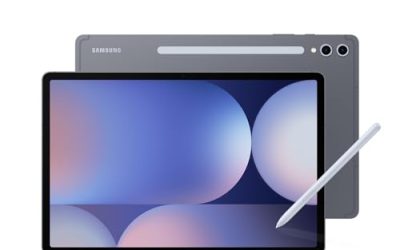
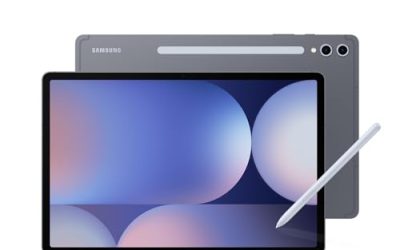
The Surface Pro 11 bundle is the most straightforward answer for a portable office because the listing is built around the full working kit rather than the tablet alone. It is described as a 2-in-1 tablet with a Pro Keyboard and a Surface Pen, as a Copilot+ PC with a 13-inch OLED PixelSense touchscreen, a Snapdragon X Elite processor, Windows 11 Pro, and a Platinum finish. For an office user, that combination matters: the pen is not a separate research project, the keyboard is not an optional extra to source later, and the operating system is the Pro edition many workplaces prefer.
In daily use, this is the model to picture on a small desk, a kitchen table, or a shared office bench. Detach or fold back the keyboard and the tablet becomes a notepad for handwritten meeting notes. Reattach it and you are back to full typing for a long document. The 13-inch screen, at 2880 x 1920 resolution, gives enough room for a document and a notes panel side by side without forcing constant zooming, which is exactly the layout pen annotation encourages.
Specifications
- Display: 13-inch OLED PixelSense touchscreen, 2880 x 1920 resolution
- Processor: Qualcomm Snapdragon X Elite
- Operating system: Windows 11 Pro
- Wireless: 802.11ax Wi-Fi, as listed
- Battery life listed: 14 hours
- Dimensions listed: 11.3 x 8.2 x 0.37 inches
- Included in this bundle listing: Pro Keyboard and Surface Pen
- Colour in this listing: Platinum tablet with black keyboard
Pros
- Bundle includes both the keyboard and the pen, so the portable office kit is complete in one purchase
- OLED touchscreen suits long reading and markup sessions in varied lighting
- Windows 11 Pro fits managed office environments better than a home-only setup
- Detachable format moves quickly between typing, writing, and presenting
Cons
- Bundle weight is higher than a tablet-only purchase, so check your bag if you travel very light
- Snapdragon-based Windows works best when your essential applications are confirmed to run well on that platform
- A complete kit leaves less freedom to choose a different keyboard layout or pen style separately
2. Microsoft Surface Pro 10 — Model ZDV-00019
The Surface Pro 10 is the business-leaning option in this group. Its listing describes a 13-inch tablet running Windows 11 Pro, with pen and touch input, a versatile kickstand, facial recognition, and NFC sign-in. Those details point at a specific kind of portable office: one where the device moves between locations, networks, and meeting rooms, and where signing in quickly and securely matters as much as writing neatly.
For a consultant, inspector, sales lead, or manager who works from client sites, that sign-in story is practical. You open the tablet, authenticate, annotate the document in front of the client, and close it again, without turning the meeting into a password-typing exercise. The 13-inch format keeps the device close to paper size, which makes pen work feel natural: contracts, checklists, site notes, and marked-up drawings all sit comfortably at that scale.
Specifications
- Display: 13-inch PixelSense touchscreen
- Processor: Intel Core Ultra 7
- Operating system: Windows 11 Pro
- Storage in this listing: 256GB SSD
- Model number: ZDV-00019
- Input: pen and touch input, as described in the listing
- Sign-in features described: facial recognition and NFC sign-in
- Form factor: tablet with kickstand
Pros
- Windows 11 Pro and business-oriented sign-in features suit managed and client-facing work
- Pen and touch input are central to the design, not an accessory afterthought
- Kickstand makes hands-free calls and desk presentations simple without a separate stand
- 13-inch size balances handwriting space with genuine portability
Cons
- 256GB of storage fills quickly for offline-heavy workflows
- Keyboard and pen arrangements vary by listing, so confirm exactly what is included before ordering
- Business features are wasted if your office is a single unmanaged home desk
3. Microsoft Surface Pro 9
The Surface Pro 9 represents the established Intel-based route into this category. Its listing describes a 13-inch 2-in-1 tablet and laptop with an Intel 12th Gen Core i7 processor, 16GB of RAM, 256GB of storage, and Windows 11, in Graphite. It also describes the display as a virtually edge-to-edge 13-inch PixelSense display built for touch and pen, and it specifically references work with the Surface Slim Pen 2. For office users who prefer Intel-based Windows hardware and a proven detachable design, that is a reassuring combination.
The portable office case for the Pro 9 is familiarity. It behaves like a conventional Windows laptop when the keyboard is attached, which shortens the learning curve for staff who are new to pen input. Then, when a task turns visual — reviewing a layout, signing an approval, sketching a process on a call — the pen is already part of the same device. The 1080p HD camera mentioned in the listing also fits the hybrid office pattern, where the same machine that takes notes in the morning runs video calls in the afternoon.
Specifications
- Display: 13-inch PixelSense touchscreen, 2880 x 1920 resolution
- Processor: Intel 12th Gen Core i7
- Memory: 16GB RAM
- Storage: 256GB
- Operating system: Windows 11
- Weight listed: 1.9 pounds
- Camera detail in listing: 1080p HD front camera
- Pen support: display built for touch and pen, with Surface Slim Pen 2 referenced in the listing
Pros
- Intel processor suits offices that standardise on Intel-based Windows hardware
- 16GB of RAM handles documents, browser tabs, and calls running together
- Mature detachable design with a display explicitly built for touch and pen
- Light enough to carry as the only machine between home and office
Cons
- 256GB storage is modest for large local file collections
- Pen and keyboard may be separate purchases depending on the exact listing configuration
- An earlier generation, so compare features carefully against the newer models above
4. ASUS ROG Flow Z13 — Model GZ302EA-XS96
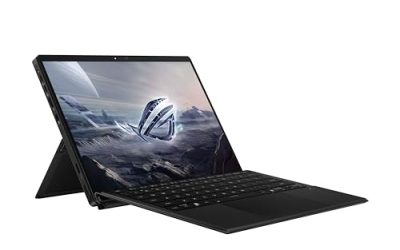
The ROG Flow Z13 is the outlier in this guide, and it is included for a specific portable office: the one that also does heavy work. Its Amazon listing describes a 13.4-inch convertible 2-in-1 with a 2.5K touchscreen at a 180Hz refresh rate, an AMD Ryzen AI MAX+ 395 processor, 32GB of RAM, a 1TB SSD, Windows 11 Pro, and model number GZ302EA-XS96. ASUS also lists stylus support for this model, including compatibility with the ASUS Pen with MPP 2.0 support. That makes it a pen-enabled Windows tablet, even though its personality is far more performance-focused than the Surface models.
Think of the user who annotates engineering drawings, edits large visual files, and still wants to detach and present from a tablet-sized device. For that user, the extra memory and storage remove the compromises that make slimmer tablets feel cramped. The trade-off is focus: this is a more specialised machine, and its gaming-oriented design will not suit every client-facing setting.
Specifications
- Display: 13.4-inch touchscreen, 2.5K resolution, 180Hz refresh rate, 3ms response listed in the title
- Processor: AMD Ryzen AI MAX+ 395
- Memory: 32GB RAM
- Storage: 1TB SSD
- Operating system: Windows 11 Pro
- Model number: GZ302EA-XS96
- Model year listed: 2025
- Stylus support: yes, with ASUS Pen MPP 2.0 support noted by ASUS for this model
Pros
- 32GB of memory and a 1TB SSD remove the storage and multitasking limits of slimmer tablets
- Large, high-resolution touchscreen gives detailed documents and drawings room to breathe
- Windows 11 Pro suits professional software and managed environments
- Stylus support keeps pen annotation available even in a performance-first machine
Cons
- Performance hardware makes it less discreet and less minimal than a Surface-style tablet
- More capability than a notes-and-documents office will ever use
- Confirm which accessories, including the stylus and keyboard, are included in the exact listing before ordering
How to Choose the Right Pen-Enabled Windows Tablet
Start with the pen itself, because it defines this category. Check which pen the tablet supports, whether a pen is included or sold separately, and where the pen stores or charges. A pen that lives in a keyboard slot or attaches securely is far more likely to be in your hand during a meeting than a pen carried loose in a bag pocket. If handwriting is central to your work, prioritise a supported active pen over a generic capacitive stylus, which is fine for tapping but poor for controlled writing and pressure-sensitive annotation.
Next, match the processor platform to your software. Intel-based models such as the Surface Pro 9 and Surface Pro 10 follow the conventional Windows path most offices already know. Snapdragon-based models such as the Surface Pro 11 bundle bring a newer platform, so confirm that your essential desktop applications, VPN tools, and peripherals are supported before standardising on one. AMD power in the Flow Z13 serves a different purpose again: sustained demanding work rather than maximum slimness.
Then check the working kit, not just the tablet. A portable office needs a keyboard you can type on for an hour, a stand that holds the screen steady on uneven tables, at least one versatile USB-C connection for charging, displays, and storage, and a camera positioned sensibly for calls. Add up the tablet, keyboard, pen, charger, and case as one carrying weight, because that total is what your shoulder experiences, not the tablet figure alone.
Storage deserves honest planning. Cloud-centred workers can live comfortably with 256GB. Anyone carrying offline project archives, large presentation libraries, or media files should look at larger configurations such as the 1TB Flow Z13, or commit to a disciplined external storage routine. Memory follows the same logic: 16GB covers documents, email, browser work, and calls for most people, while 32GB is for heavier multitasking and technical applications.
Finally, decide what Pro means for you. Windows 11 Pro matters if your organisation manages devices centrally, needs its security and sign-in features, or standardises on business support. For a solo portable office built around personal accounts and cloud tools, the edition matters less than the pen, screen, and kit. Buy for the working day you actually have, not the most impressive specification list.
Frequently Asked Questions
Do these tablets run full Windows applications?
Yes. All four models in this guide run Windows 11, in Home or Pro editions depending on the model and listing, so they are designed for desktop Windows applications rather than a mobile-only app store. Always confirm application compatibility for your specific software, especially on Snapdragon-based hardware.
Is the pen included with every model?
No. Inclusion varies by listing. The Surface Pro 11 option above is a bundle listing that includes a Pro Keyboard and a Surface Pen. For the other models, check the exact listing contents before ordering, because pen and keyboard arrangements differ between configurations of the same tablet family.
Can a pen-enabled Windows tablet replace a laptop in a portable office?
For documents, email, browser tools, notes, signatures, presentations, and video calls, yes, provided the keyboard and stand suit your typing habits. If your work involves long hours of typing at one desk, pair the tablet with an external keyboard and monitor at that desk and keep the detachable keyboard for travel.
Which screen size works best for handwriting?
A 13-inch class screen is the sweet spot for most office handwriting because it approximates a sheet of paper while staying portable. The 13.4-inch Flow Z13 adds a little more room for detailed work, while still remaining a carry-everywhere tablet format.
What should I check before ordering a specific listing?
Confirm the exact processor, memory, storage, Windows edition, colour, and included accessories for that listing, and confirm pen compatibility for the model. Configurations within one tablet family vary widely, and the listing details, not the family name, describe what will arrive.
Conclusion
The best pen-enabled windows tablets for portable office setups succeed by removing friction from a moving working day. The Surface Pro 11 bundle is the easiest complete kit, with pen and keyboard included alongside a 13-inch OLED touchscreen and Windows 11 Pro. The Surface Pro 10 suits business-managed and client-facing work with its Pro edition and sign-in features. The Surface Pro 9 remains a clear Intel-based all-rounder for offices that value a proven detachable design. And the ROG Flow Z13 serves the smaller group who need serious memory, storage, and processing power without giving up tablet form or stylus support.
Choose by the way you actually work: how much you write by hand, which applications must run without question, how much you carry offline, and whether the pen and keyboard are included or separate. Get those four answers right, and a single light device can credibly serve as your notebook, your laptop, your signing pad, and your presentation screen, wherever your office happens to be that day.
More from Amazon
Programs that pair well with the guide above. Offers and eligibility are set by Amazon and may change.
A free business account with business pricing and bulk-buying tools for work, shop or home office.
Create a business accountFree shipping on eligible items, Prime Video and more. Eligible new members can start with a free trial.
Start a Prime free trialAudiobooks and podcasts to listen to on the go. Eligible new members can start with a free trial.
Try Audible freeAd-free music streaming. Eligible new subscribers can start with a free trial.
Try Music Unlimited freeAs an Amazon Associate we earn from qualifying purchases.




Write Your Review
No reviews yet. Be the first to share your experience!