

Key takeaways
- Find the best large-screen Android tablets for creative travel workflows, with stylus support, vivid displays, and long battery life for work on the move.
Introduction
A large-screen Android tablet can carry a surprising amount of a creative workflow. On a single slab of glass, a photographer can cull a morning shoot, a designer can sketch a concept, a writer can draft a feature, and a video maker can assemble a rough cut, all from a train seat, a cafe table, or a hotel desk. The screen is the workspace, the stylus is the pen, and the battery is the clock. When those three things work well together, the tablet stops being a second device and becomes the main tool for the trip.
The keyword here is large. A compact tablet is fine for reading and watching, but creative work needs room: room for a canvas beside a palette, room for a timeline under a playback window, room for a document beside a reference image. A display of 12 inches or more changes how an app feels, because panels and toolbars no longer crowd the work itself. Split-screen multitasking becomes practical rather than cramped, and handwriting and sketching feel closer to working on paper.
This guide looks at four large-screen Android tablets that fit that brief. Each one has a display of 12.1 inches or larger, runs Android, and supports stylus input for drawing, handwriting, and precise markup. Each one is listed on Amazon US, and each one is linked below so the exact model can be checked directly. The guide explains what to look for before choosing, compares the four picks side by side, and answers the questions that come up most often when a tablet has to earn its place in a travel bag.
How to Choose a Large-Screen Android Tablet for Creative Travel Workflows
Choosing a tablet for creative work on the move is different from choosing one for the sofa. The priorities shift toward the display, the stylus, the battery, and the weight, in that order. A tablet that looks good on a spec sheet can still disappoint on a trip if the screen washes out in daylight or the battery fades before the work is done.
Display size and quality
Size is the first decision. A 12.1-inch display is the smallest that still feels generous for creative work, while a 12.7-inch display adds a little more room for timelines and toolbars. Look for a high resolution as well, because fine text, detailed sketches, and photo editing all benefit from sharp rendering. A resolution around 2800 by 1752 pixels or higher keeps edges crisp at normal viewing distance.
Panel type matters too. An AMOLED display produces deep blacks and vivid colour, which helps when judging photos and video. An LCD display can still be excellent, especially at higher resolutions with a fast refresh rate, and it often costs less. A refresh rate of 90 Hz or 120 Hz makes scrolling, sketching, and handwriting feel smoother, because the screen updates more often as the stylus moves. Anti-reflective coatings and high brightness help outdoors and near windows, two places where travel work often happens.
Stylus support
A stylus turns a tablet into a sketchbook, a notebook, and a markup tool. The best arrangement for travel is a stylus that ships in the box, because there is nothing extra to buy, charge, or lose. Samsung includes its S Pen with the tablets in this guide, and Lenovo includes its Tab Pen Plus with the Tab P12. OnePlus supports its Stylo as a separate accessory, so that extra item needs to be planned for. A stylus that charges and stores magnetically on the tablet is less likely to be left behind, and low latency matters, because a visible lag between pen and line breaks concentration.
Battery life and charging
Battery life is the practical limit on a travel workday. A tablet with a battery capacity around 10,000 mAh can usually last through a long stretch of mixed work, including sketching, writing, browsing, and media playback. The exact number of hours depends on screen brightness, the apps in use, and whether Wi-Fi and Bluetooth are active, so treat any hour figure in a listing as a guide rather than a promise.
Weight, performance, and software
A large tablet is heavier than a small one, and the difference is felt at the end of a long day. A tablet around 1.25 pounds is easy to hold for short stretches and easy to carry in a bag, while a heavier tablet is better used on a stand, a tray table, or a desk. A slim profile helps too, because a thin tablet slides into a bag sleeve beside a laptop without adding bulk.
Creative apps are demanding. Photo editing, video trimming, and multitasking with several apps open all benefit from a capable processor and generous memory. Twelve gigabytes of memory gives plenty of headroom for switching between apps without reloading, while eight gigabytes is enough for lighter workflows built around notes, sketches, and documents. Storage matters just as much: 256 GB holds a comfortable library of projects and media, while 128 GB fills up faster and relies more on cloud storage or a microSD card. A microSD slot is a useful safety net on a trip, because it provides extra space without an internet connection.
Top Picks
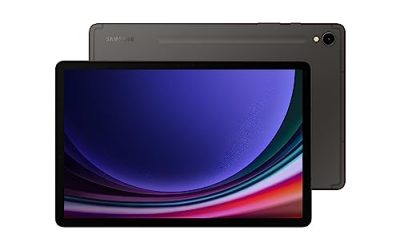
Samsung Galaxy Tab S10+ Plus

The Samsung Galaxy Tab S10+ Plus is the most complete creative travel tablet in this guide. Its 12.4-inch Dynamic AMOLED 2X display, with a resolution of 2800 by 1752 pixels, is vivid and sharp, with deep blacks that help photos and video look their best.
The tablet ships with the S Pen in the box, and the pen needs no battery of its own. Handwriting, sketching, and markup feel direct, and the pen attaches magnetically to the tablet for storage and charging. The MediaTek Dimensity 9300+ processor, paired with 12 GB of memory and 256 GB of storage, handles photo editing, multitasking, and split-screen work without hesitation, and a microSD slot adds room for more files when a trip runs long.
Battery capacity is 10,090 mAh, and the tablet weighs 1.25 pounds and measures 0.22 inches thick. It runs Android 14, with Samsung DeX giving a desktop-style layout when a keyboard is attached. The Moonstone Gray US version listed here is the Wi-Fi model with 256 GB of storage, and it is the pick for a creative traveller who wants the strongest display and the most polished stylus experience in a still-portable size.
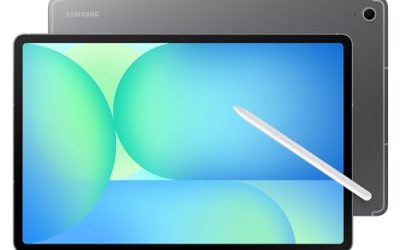
Samsung Galaxy Tab S9 FE+ Plus

The Samsung Galaxy Tab S9 FE+ Plus is the sensible pick for a creative traveller who wants a large screen and an included stylus without stepping up to the flagship tier. Its 12.4-inch display runs at 90 Hz with WQXGA resolution, which keeps text sharp and sketching smooth, and the panel is bright enough for work in a cafe or by a window. The tablet includes the S Pen in the box, so drawing, handwriting, and annotation are ready from the first day, with no separate accessory to buy.
Inside, the Exynos 1380 processor and 8 GB of memory handle notes, sketches, documents, photo browsing, and media playback with ease, and 128 GB of storage covers a working set of projects, with expandable storage available through a microSD card for longer trips. The listing describes long battery life, and the battery capacity is 10,090 mAh, matching the larger Galaxy tablets in this guide. The Gray US version from 2023 listed here remains a strong match for the brief: a large display, a real stylus, and long battery life, at a more modest tier than the flagship model.
Lenovo Tab P12

The Lenovo Tab P12 is the value-led pick in this guide, and it earns its place with a large, sharp display and a stylus in the box. Its 12.7-inch display is the largest here, and its 3K resolution of 2944 by 1840 pixels keeps fine detail crisp for sketching and photo work. Four JBL speakers with Dolby Atmos support give audio editing and video playback a clear, spacious sound, which matters when headphones are not practical.
The tablet includes the Lenovo Tab Pen Plus, so note-taking, sketching, and precise control are available without an extra purchase. At 1.39 pounds it is easy to carry, and the Gray US version listed here, model ZACH0177US, is the pick for a traveller who wants the largest screen in this guide at a lower tier, with a capable stylus, strong speakers, and a battery that lasts through a long day. The MediaTek Dimensity 7050 processor, 8 GB of memory, and 128 GB of storage suit everyday creative workflows built around notes, documents, sketches, and media, and Wi-Fi 6 keeps downloads and cloud sync moving quickly where a network is available. Battery life is listed at up to 10 hours, supported by a 10,200 mAh battery, which covers a full stretch of travel work.
OnePlus Pad 2

The OnePlus Pad 2 is the performance-led pick for a creative traveller who values speed and a fast, sharp display. Its 12.1-inch display uses a 3K resolution of 3000 by 2120 pixels and a refresh rate of 144 Hz, which makes sketching, scrolling, and video playback feel exceptionally smooth. The Snapdragon 8 Gen 3 processor, paired with 12 GB of memory and 256 GB of storage, is the strongest chip in this guide, and it handles demanding apps, multitasking, and large files with ease. Six speakers provide clear audio for video work, and the battery capacity is listed at 9,610 mAh in the Amazon listing summary, with fast charging support for short stops between sessions. Stylus input is supported through the OnePlus Stylo, which is a separate accessory rather than an included item, so a traveller who sketches or handwrites should plan for that addition. The Nimbus Gray model listed here is the pick for a creative traveller who wants flagship-level speed, a high-refresh display, and a light, slim body, and who is willing to add a stylus to complete the creative kit.
Comparison Table
| Product | Key Feature | Best For |
|---|---|---|
| Samsung Galaxy Tab S10+ Plus | 12.4-inch Dynamic AMOLED 2X display, S Pen included, 10,090 mAh battery | The strongest display and stylus experience for photo and design work on the move |
| Samsung Galaxy Tab S9 FE+ Plus | 12.4-inch 90 Hz display, S Pen included, 10,090 mAh battery | A balanced large-screen creative tablet with pen input at a more modest tier |
| Lenovo Tab P12 | 12.7-inch 3K display, Tab Pen Plus included, quad JBL speakers | The largest screen and strongest speakers for sketching, notes, and media on a trip |
| OnePlus Pad 2 | 12.1-inch 3K 144 Hz display, Snapdragon 8 Gen 3, 12 GB memory | Fast performance and a high-refresh display for demanding apps and smooth sketching |
Buying Guide
Match the tablet to the work
Before choosing, list the apps that will actually run on the trip. A workflow built around handwriting, sketching, and documents needs a good stylus and a comfortable display more than it needs the fastest chip. A workflow built around photo editing and video trimming needs more memory, more storage, and a display that can be trusted for colour. A workflow built around writing needs a good keyboard option and a desktop-style mode. Matching the tablet to the work avoids paying for power that will never be used, and it avoids buying a tablet that struggles with the one task that matters most.
Test the stylus before the trip
A stylus is a personal tool, and small differences in weight, grip, and latency matter over a long session.
Plan storage and backup
Creative files grow quickly, especially photos and video. Before a trip, clear space on the tablet, move finished projects to a laptop or cloud storage, and check that the microSD card, if one is used, is formatted and working.
Build a light travel kit
A large tablet, a stylus, a compact keyboard, a charging cable, and a small stand can replace a laptop for many creative trips, and the whole kit often weighs less than a laptop and charger.
Frequently Asked Questions
Is a 12-inch tablet large enough for creative work on the move?
Yes, for most creative travel workflows. A display of 12.1 inches or larger gives enough room for a canvas beside a toolbar, a document beside a reference image, or a timeline under a playback window.
Do I need a stylus, or can I work with touch alone?
Touch alone works for browsing, tapping, and light editing, but a stylus is much better for drawing, handwriting, and precise selection. A stylus gives fine control over lines and marks, supports pressure sensitivity for sketching, and makes handwriting feel natural.
How much battery life do I need for a travel workday?
A battery capacity around 10,000 mAh is a good baseline, and all four tablets in this guide sit close to that figure. Actual hours depend on screen brightness, the apps in use, and connectivity, so a tablet that lasts a full day of light work may last fewer hours under heavy photo or video editing.
Can a large Android tablet replace a laptop for creative travel?
For many creative travellers, yes, at least for the drafting and editing stages of a workflow. A large tablet with a stylus, a keyboard, and a desktop-style mode handles writing, sketching, photo culling, and rough video assembly well.
Conclusion
The best large-screen Android tablet for creative travel workflows is the one that fits the work, the bag, and the day. The Samsung Galaxy Tab S10+ Plus leads this guide with its vivid AMOLED display, included S Pen, and strong all-round performance, and it suits a traveller who wants the most polished creative experience in a portable size. The Samsung Galaxy Tab S9 FE+ Plus covers the same core needs, including a large display and an included stylus, at a more modest tier. The Lenovo Tab P12 gives the largest screen and the strongest speakers, with a stylus in the box, for a traveller who values room and sound. The OnePlus Pad 2 brings flagship speed and a high-refresh display in a light, slim body, for a traveller who wants performance first and is willing to add a stylus.
Whichever tablet is chosen, the habits matter as much as the hardware: set up the apps before departure, keep files backed up, carry a charger and a stand, and give the stylus a home on the tablet so it is always at hand. With those habits in place, a large-screen Android tablet becomes a complete creative studio that fits in a travel bag, ready whenever an idea arrives.
Disclosure: As an Amazon Associate, we earn from qualifying purchases.
More from Amazon
Programs that pair well with the guide above. Offers and eligibility are set by Amazon and may change.
A free business account with business pricing and bulk-buying tools for work, shop or home office.
Create a business accountFree shipping on eligible items, Prime Video and more. Eligible new members can start with a free trial.
Start a Prime free trialAudiobooks and podcasts to listen to on the go. Eligible new members can start with a free trial.
Try Audible freeAd-free music streaming. Eligible new subscribers can start with a free trial.
Try Music Unlimited freeAs an Amazon Associate we earn from qualifying purchases.
Write Your Review
No reviews yet. Be the first to share your experience!