

Key takeaways
- Compare the best pen-enabled windows tablets for creative travel workflows: three Windows tablets and 2-in-1s for sketching, notes and editing on the road.
Creative work on the road asks a Windows tablet to do three jobs at once: run full desktop software, accept a pen without lag, and survive a day in a bag. A tablet that only handles one of those jobs will frustrate a traveler who sketches on a train, marks up a PDF in a hotel room, and edits photos at a cafe table. The real decision is about the balance between pen quality, screen quality, weight, and battery, because the lightest tablet is useless if its pen lags and the most powerful one is useless if it dies by midday. Weight and battery decide which one actually leaves the house.

This guide is for illustrators, designers, note-takers, and field editors who travel with their creative work and need a Windows device that works with a stylus. The three tablets below were chosen from the names and specifications shown on their Amazon product pages, comparing the pen experience, display, processor, and how each one carries on the road.
Quick Picks
As an Amazon Associate we earn from qualifying purchases
| Product | Best for | Key spec from title |
|---|---|---|
| Microsoft Surface Pro 11 | Lightest travel tablet with an OLED screen | 13-inch OLED touchscreen, Snapdragon X Elite |
| ASUS ROG Flow Z13 (2025) | Heavy creative work in tablet form | 13.4-inch 2.5K 180Hz touchscreen, Ryzen AI MAX+ 395 |
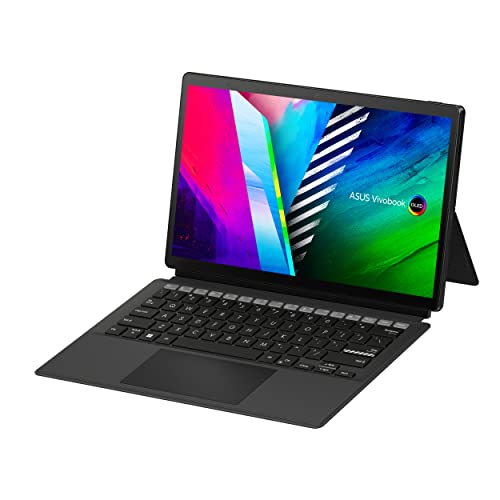
| ASUS Vivobook 13 Slate OLED | Pen included, lowest weight in the bag | 13.3-inch FHD OLED touch display, ASUS Pen 2.0 included |
How to Choose
Pen Feel and Latency
The pen decides whether a tablet feels like paper or like a mouse. Pressure levels matter: 4,096 levels let a sketch move from a faint line to a bold stroke without a visible step, while tilt support lets shading follow the angle of the hand. Latency matters just as much, because a visible gap between the pen tip and the ink breaks the connection between hand and screen. Check whether the pen ships in the box or sells separately, since a tablet that needs an extra purchase costs more than its listing suggests and leaves a traveler without a pen on the first trip. Rechargeable pens add another cable to pack.
Display for Creative Work
A creative display needs accurate color more than it needs raw brightness. An OLED panel shows deep blacks and a wide color range, which helps photo editing and illustration where color judgment matters. Resolution decides how fine the detail looks when zooming into a drawing, while a high refresh rate makes pen strokes track smoothly across the screen. A matte or anti-reflective coating helps when working near a window or outdoors, and a 3:2 or 16:10 aspect ratio gives more vertical room for documents and timelines than a wide 16:9 screen. A bright screen also helps outdoors, where a dim panel washes out in sunlight.
Weight, Battery and Travel
Travel weight is the sum of the tablet, the keyboard, the charger, and the pen, so check the whole kit rather than the tablet alone. A tablet under two pounds with a detachable keyboard packs small and leaves room in the bag for a notebook and a charger. Battery life decides whether the tablet survives a full workday away from a wall socket, and a machine that needs its charger by midday is a poor travel companion. Fast charging over USB-C helps when a layover gives only an hour to top up. A tablet that charges over USB-C can share one charger with a phone.
Software and Ports
A Windows tablet earns its place by running full desktop software rather than mobile apps, so confirm the processor handles the tools the workflow needs. ARM-based tablets run most creative apps well now, but a few plug-ins and older tools still expect an x86 processor, so check compatibility before buying. Ports matter on the road: two USB-C ports let a traveler charge and connect a drive at the same time, while a microSD slot gives cheap extra storage for photo and video files. Cloud sync keeps files moving between the tablet and a desktop without cables. A spare pen tip in the bag saves a trip.
The 3 Best Options
Microsoft Surface Pro 11
The Surface Pro 11 is the lightest travel tablet of the three, built around a 13-inch OLED touchscreen and a Snapdragon X Elite processor with twelve cores. The OLED panel shows 2880 x 1920 pixels with a refresh rate up to 120Hz, which makes pen strokes track smoothly and colors look true for photo work. The tablet weighs about 0.9 kg, and the kickstand folds flat for sketching on a tray table or a lap. The kickstand also folds flat for sketching on a tray table. The Surface Slim Pen works with the tablet and sells separately, so budget for it alongside the device.
Specs
- 13-inch OLED touchscreen, 2880 x 1920, up to 120Hz
- Snapdragon X Elite processor with 12 cores
- 16GB memory and 1TB SSD storage
- Weight of about 0.9 kg
- Battery of 53 Wh, around 12 hours of use
- Box contents: device, power supply, quick start guide, safety and warranty documents
- Works with the Surface Slim Pen, sold separately
Best for: Travelers who want the lightest Windows tablet with an OLED screen for sketching and editing.
Watch out for: The pen and keyboard sell separately, so the ready-to-work kit costs more than the tablet alone.
ASUS ROG Flow Z13 (2025)
The ROG Flow Z13 is the pick when creative travel work needs real processing power in tablet form. Its 13.4-inch 2.5K touchscreen runs at 180Hz with full DCI-P3 color coverage, and the Ryzen AI MAX+ 395 processor with sixteen cores and 32GB of unified memory handles heavy photo and video work that lighter tablets cannot. The detachable keyboard turns it into a laptop, and the 170-degree kickstand props it up for sketching or presenting. A 70Wh battery keeps it going through a work session, and the tablet weighs about 2.65 pounds. The keyboard detaches for pure tablet use on a plane.
Specs
- 13.4-inch 2.5K touchscreen, 2560 x 1600, 180Hz, full DCI-P3 coverage
- AMD Ryzen AI MAX+ 395 processor with 16 cores
- 32GB LPDDR5X memory and 1TB SSD storage
- Stylus support on the touchscreen
- 170-degree adjustable kickstand
- 70Wh battery
- Weight of about 2.65 pounds
- Windows 11 Pro
Best for: Creators who need desktop-class power for editing and rendering while traveling.
Watch out for: The heavier build and stronger processor trade battery life for power under load.
ASUS Vivobook 13 Slate OLED
The Vivobook 13 Slate OLED is the only tablet of the three that ships with a pen in the box, which makes it the simplest pick for a traveler who wants to start sketching immediately. The ASUS Pen 2.0 supports 4,096 pressure levels and comes with four interchangeable tips, while the 13.3-inch FHD OLED touch display shows rich color for illustration and photo review. The detachable keyboard, cover stand, and sleeve all come in the box, so the travel kit is complete on day one. The sleeve protects the screen in a crowded bag. The Pentium N6000 processor suits notes, sketching, and light editing rather than heavy rendering.
Specs
- 13.3-inch FHD OLED touch display, 1920 x 1080
- Intel Pentium N6000 quad-core processor
- 4GB RAM and 128GB eMMC storage
- ASUS Pen 2.0 included, 4,096 pressure levels, 4 interchangeable tips
- Detachable keyboard, cover stand, and sleeve included
- 13MP camera and quad-speaker Dolby Atmos audio
- Windows 11 Home in S mode
Best for: Travelers who want a complete pen-and-keyboard kit in the box at the lowest weight.
Watch out for: The Pentium processor and 4GB of memory limit heavy editing and large files.
Which One Fits Your Situation
Illustrator on the Move
An illustrator who sketches on trains and in cafes should pick the Vivobook 13 Slate OLED. The pen comes in the box with four tips, the OLED screen shows true color, and the whole kit including keyboard and sleeve is ready on day one. The included pen means no extra purchase before the first trip. The light build leaves room in the bag for a sketchbook and a charger.
Photo Editor Traveling Light
A photo editor who needs accurate color and a light bag should pick the Surface Pro 11. The 13-inch OLED panel and 120Hz refresh rate make editing precise, and the tablet weighs about 0.9 kg, which is the lightest of the three. The OLED panel keeps colors true for client work on the road. The Slim Pen sells separately, so add it to the kit before the first trip.
Heavy Editing on the Road
A creator who edits video or renders large files while traveling should pick the ROG Flow Z13. The sixteen-core processor and 32GB of memory handle work that stops lighter tablets, and the 180Hz screen with full DCI-P3 coverage keeps color accurate. The kickstand props the screen for a video call from a hotel room. The 70Wh battery and 170-degree kickstand make it workable away from a desk.
Note-Taker and Mark-Up
A traveler who mainly takes notes and marks up documents should pick the Vivobook 13 Slate OLED. The included pen and detachable keyboard cover the whole workflow, the OLED screen stays readable in bright rooms, and the modest processor is enough for notes, PDFs, and light sketching. The modest processor handles notes and PDFs without slowing down. A full day of notes fits easily on one charge.
Common Mistakes
- Buying a tablet that needs a pen sold separately, then traveling without one.
- Choosing a screen for brightness while ignoring color accuracy for creative work.
- Counting only the tablet weight and forgetting the keyboard, charger, and pen.
- Picking an ARM tablet without checking that the creative apps and plug-ins support it.
- Ignoring battery life, then hunting for a wall socket by midday.
Frequently Asked Questions
Does every pen-enabled Windows tablet include a pen?
No, and the difference matters for the total cost. The Vivobook 13 Slate OLED ships with the ASUS Pen 2.0 in the box, while the Surface Pro 11 needs the Surface Slim Pen bought separately. The ROG Flow Z13 supports a stylus on its touchscreen. Always check the box contents on the listing before assuming the pen is included.
Is an OLED screen worth it for creative travel work?
Yes, when color accuracy matters. An OLED panel shows deep blacks and a wide color range, which helps photo editing and illustration where judging color by eye is part of the work. The Surface Pro 11 and the Vivobook 13 Slate OLED both use OLED panels, while the Flow Z13 uses an IPS panel with full DCI-P3 coverage.
Can a Windows tablet replace a laptop for creative work?
It can when the processor and software match the workflow. The Flow Z13 runs heavy editing, and the Surface Pro 11 handles most creative apps with its Snapdragon chip. Lighter tablets like the Vivobook suit notes and sketching better than rendering. Check that the apps and plug-ins the workflow needs run on the tablet’s processor first.
What should a travel kit include besides the tablet?
A keyboard, a pen, a charger, and a sleeve cover the basics. The Vivobook ships all of these in the box, while the Surface Pro 11 needs a keyboard and pen bought separately. A USB-C charger that also powers a phone saves bag space, and a microSD card adds cheap storage for photos and video on the road.
More from Amazon
Programs that pair well with the guide above. Offers and eligibility are set by Amazon and may change.
A free business account with business pricing and bulk-buying tools for work, shop or home office.
Create a business accountFree shipping on eligible items, Prime Video and more. Eligible new members can start with a free trial.
Start a Prime free trialAudiobooks and podcasts to listen to on the go. Eligible new members can start with a free trial.
Try Audible freeAd-free music streaming. Eligible new subscribers can start with a free trial.
Try Music Unlimited freeAs an Amazon Associate we earn from qualifying purchases.




Write Your Review
No reviews yet. Be the first to share your experience!