

Key takeaways
- Router plus wired access points: one router in the basement or main floor, and an access point on each upper floor connected by cable. This provides the most consistent signal for tall houses if wiring is possible.
- Powerline or MoCA adapters: where coax or electrical wiring already exists, these can serve as a wired backhaul between floors, subject to the home’s wiring condition and the adapter manual.
- Linksys Velop Pro 7: a roundup lists it as a good-value Wi-Fi 7 option, with an app described as a little flaky.
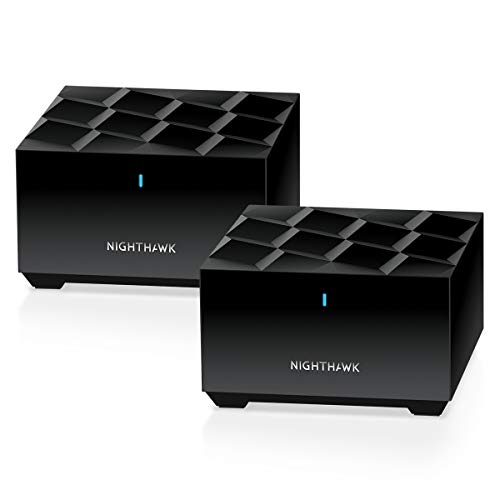
For a three-story home, a three-node tri-band Wi-Fi 7 mesh with wired backhaul is the strongest approach: the TP-Link Deco BE63 suits most households, the Netgear Orbi 970 suits very large homes or those wanting a dedicated wireless backhaul, and the eero Max 7 or Deco BE85 suit buyers with multi-gigabit plans and Ethernet between floors. The key is one node per floor, because signal weakens sharply passing through floors.
Our top picks



As an Amazon Associate we earn from qualifying purchases at no extra cost to you.
Why three stories are hard on Wi-Fi
Floors are among the worst obstacles for Wi-Fi. Wooden joists, plywood, insulation, metal ducts, wiring and concrete in some buildings absorb the signal, and a router on the first floor may leave the top floor with a weak link. Signal also travels in a pattern shaped like a doughnut around the antennas, which means the area directly above or below a router can be weaker than the area beside it.
The result is that the square footage printed on a box says less about a three-story home than the number of floors. Even if a two-pack is rated for 5,800 sq ft, a tall narrow house may need three units because each floor is its own zone. Place one unit near the center of each floor, and avoid stacking the nodes directly above one another in a way that leaves corners uncovered.
At a glance: mesh systems for multi-floor homes
| Model | Best for | Key stated specs | Limits |
|---|---|---|---|
| TP-Link Deco BE63 | Most three-story homes, mid-range budget | The maker lists Wi-Fi 7 tri-band BE10000, up to 5,800 sq ft with a 2-pack, four 2.5 Gbps ports per unit, wired and wireless backhaul, up to 200 devices | HomeShield extras may be paid; a third unit may be needed per floor |
| Netgear Orbi 970 (3-pack) | Large homes, dedicated backhaul, premium budget | Quad-band Wi-Fi 7, up to 10,000 sq ft with three units, about 3,300 sq ft per unit, 10 Gig WAN on the router, 10 Gbps and 2.5 Gig LAN ports on satellites | Premium tier |
| TP-Link Deco BE85 | Wired backhaul at 10 Gbps | Tri-band Wi-Fi 7, two 10 Gbps and two 2.5 Gbps ports per unit, USB 3.0 | Coverage figures differ between sources; two speed versions exist |
| eero Max 7 (3-pack) | Simple app, multi-gig plans | Up to 2,500 sq ft per unit, 7,500 sq ft for three, two 10 Gbps and two 2.5 Gbps ports per unit | Mixed reviews; some features are subscription based |
| eero Pro 7 | Lower tier within the same family | Reported 2,000 sq ft per unit and 6,000 sq ft for three, two 5 GbE ports per unit | Less capable radios than the Max 7 |
TP-Link Deco BE63: the default recommendation
With a listed 5,188 Mbps on 6 GHz, 4,324 Mbps on 5 GHz and 574 Mbps on 2.4 GHz, plus Multi-Link Operation, the BE63 is a capable tri-band system. TechRadar and RTINGS place it at or near the top of their mesh lists according to summaries of those rankings. For a three-story home, the four 2.5 Gbps ports per unit matter: you can connect a node on each floor to a wall jack and get a wired backhaul, which frees the wireless bands for devices. If you cannot wire the floors, the system falls back on its tri-band wireless backhaul. Buy a three-pack if the home has three floors of any size.
Netgear Orbi 970: dedicated backhaul for large houses
The Orbi 970 uses four bands, including a second 5 GHz band that Netgear describes as a dedicated backhaul. For a three-story house, this is valuable when you cannot run cable: the link between floors does not compete with your phones and laptops. The three-pack is listed for up to 10,000 sq ft with about 3,300 sq ft per unit, and the router has a 10 Gig internet port. It is the most commonly named choice for very large homes, though buyers with ordinary plans may find it surplus to need.
Deco BE85 and eero Max 7: for multi-gig builds
The Deco BE85 offers one 10 Gbps combo port, a second 10 Gbps port and two 2.5 Gbps ports per unit, so a house with fiber, Ethernet runs or a home office could wire each floor at high speed. Sources disagree on coverage, ranging around 6,400 to 6,500 sq ft for two units, and TP-Link sells versions with different rated speeds. The eero Max 7 gives two 10 Gbps and two 2.5 Gbps ports on each unit, up to 2,500 sq ft each, and 7,500 sq ft for three. One reviewer noted that its 10 Gbps ports sustained about 6 Gbps, and Dong Knows Tech was harsh in its review, so weigh the mixed feedback against its ease of use.
Placement plan for a three-story house
- Put the router unit on the floor where the modem enters. That is often the basement or ground floor, but if the internet enters low in the house, consider running a cable to a central floor.
- Place one node on each remaining floor. Keep each node near the center of its floor and in the open.
- Use Ethernet where possible. Wired backhaul between floors is the most effective improvement. If wall jacks exist, use them. If not, a single cable run through a closet or chase can help.
- Avoid the corner of the house. A node at the edge wastes half its signal outdoors.
- Keep nodes clear of metal. Avoid placing them next to large appliances, steel shelving or ducts.
- Test each floor. Walk through with a phone and check speed in the farthest rooms, then move nodes a few feet if needed.
Wireless versus wired backhaul on multi-floor homes
| Backhaul | Strength | Weakness |
|---|---|---|
| Wired Ethernet | Stable, full speed, frees wireless bands | Needs cable between floors |
| Dedicated wireless band (Orbi 970) | No cable; traffic separated from devices | Still passes through floors and loses strength |
| Shared tri-band wireless (Deco BE63 without cable) | Simple, no cable | Backhaul shares airtime with devices |
Budget tiers
| Tier | What fits | Trade-off |
|---|---|---|
| Budget | Dual-band mesh such as the Netgear Orbi 370 series, per roundups | No dedicated backhaul; likely slower on upper floors |
| Mid-range | Deco BE63 three-pack, with Netgear Orbi 770 and ASUS ZenWiFi BT10 appearing in roundups | Subscription extras on some brands |
| Premium | Orbi 970, Deco BE85, eero Max 7 | Higher cost; benefits depend on a fast plan and wired layout |
Pick X if you…
| If you… | Choose | Reason |
|---|---|---|
| Want a balanced system for three floors | Deco BE63 three-pack | Wi-Fi 7, 2.5 Gbps ports for wiring each floor |
| Cannot run cable and the house is large | Orbi 970 | Dedicated wireless backhaul band |
| Have a multi-gig plan and wired runs | Deco BE85 | 10 Gbps ports on each node |
| Prefer the simplest app | eero Max 7 | Easy setup; check reviews first |
| Have a tight budget and modest speeds | Orbi 370 series | Roundups describe it as a budget dual-band system |
Alternatives
- Router plus wired access points: one router in the basement or main floor, and an access point on each upper floor connected by cable. This provides the most consistent signal for tall houses if wiring is possible.
- Powerline or MoCA adapters: where coax or electrical wiring already exists, these can serve as a wired backhaul between floors, subject to the home’s wiring condition and the adapter manual.
- Linksys Velop Pro 7: a roundup lists it as a good-value Wi-Fi 7 option, with an app described as a little flaky.
Setup notes
Install the app and add nodes one floor at a time. Connect the router unit to the modem and let it update before adding satellites. Use a single network name, then check device handoff by walking between floors on a video call. If a smart-home device cannot connect, it may only support 2.4 GHz and need temporary settings in the app. Keep firmware current, and restart the system if it has been running for months without updates.
Frequently Asked Questions
How many mesh nodes does a three-story home need?
Usually three, one per floor, although a smaller home of the same height might get by with two. Maker coverage ratings help, but floors reduce range, so plan by floor rather than only by square footage.
Is wired backhaul necessary?
It is not required, but it is the biggest improvement for multi-floor homes. If you can run Ethernet or use existing wall jacks, do it. Otherwise choose a tri-band or quad-band system with a strong wireless backhaul.
Where should the main unit go?
Put it where the modem connects, then place the other nodes centrally on their floors. If the modem is in a basement corner, consider moving the modem connection or running a cable so the main unit is more central.
Is Wi-Fi 7 worth it for a three-story house?
The tri-band design and extra 6 GHz capacity can help backhaul and busy homes, especially with Wi-Fi 7 devices. If your devices are older, a well-placed Wi-Fi 6 system still improves coverage.
Do these systems require subscriptions?
Core Wi-Fi works without one. Advanced security, parental controls or analytics may be linked to paid tiers on some brands, so check what is included before you buy.
What if I still have a dead spot on the top floor?
Move the node a few feet, raise it to a shelf, or add a wired connection. Avoid placing it in a closet or behind metal, and use the app to see signal strength between nodes.









Write Your Review
No reviews yet. Be the first to share your experience!