

Our Short List of 3

- Best for: annotators who want a large screen and a long-lasting battery in a tablet that still fits easily in a bag.

- Best for: readers who want the 12.4-inch screen size and the Snapdragon processor at a lower tier than the current generation.

- Best for: annotators who carry their tablet everywhere and want the newest processor and the longest software support in the smallest body.
All 3 Picks at a Glance
| Product | Specs | Action |
|---|---|---|
| Samsung Galaxy Tab S10+ — ASIN B0D84MHZX5 |
| Check price on Amazon |
| Samsung Galaxy Tab S9+ — ASIN B0C4BBNP7R |
| Check price on Amazon |
| Samsung Galaxy Tab S11 — ASIN B0FGKN976K |
| Check price on Amazon |
Key takeaways
- Compare the best OLED Android tablets for document annotation: bright AMOLED screens, included S Pen styluses, and long battery life for marking up PDFs.
Annotating documents on a tablet only works well when the screen shows text crisply, the stylus tracks the pen accurately, and the device stays comfortable through a long reading session. An OLED panel helps on all three fronts: deep blacks keep text edges sharp, individual pixels light up without a backlight wash, and the high contrast makes highlighted passages and handwritten margin notes easy to read in bright rooms and dim ones alike. Paired with Android, an OLED tablet also gives access to a wide range of PDF readers and note apps, so the workflow is not tied to a single piece of software.
Our top pick: Samsung Galaxy Tab S10 Ultra. Runner-up: Samsung Galaxy Tab S11. The S10 Ultra wins on screen size and workspace, while the S11 is the most portable of the four tablets in this guide and the newest of the group. This guide compares published specifications only: screen size and resolution, panel type, refresh rate, processor, memory, storage, battery capacity, stylus inclusion, and connectivity, all taken from the product listings. No tablet here was used for a practical session, and no claim in this guide comes from a personal trial.
Document annotation is a specific job. A tablet for it needs a stylus that ships in the box or is designed for the device, a screen large enough to show a full page at readable size, and enough battery life to last through a working day of reading and marking up files. Every tablet in this guide is an Android tablet with an OLED panel and an included S Pen, so the comparison stays on the same type of device and the same kind of work.
At a Glance
| Product | Best for | Key specification |
|---|---|---|
| Samsung Galaxy Tab S10 Ultra | Largest annotation workspace | 14.6-inch Dynamic AMOLED 2X display, 2960 x 1848, 120 Hz |
| Samsung Galaxy Tab S10+ | Balanced size and battery | 12.4-inch Dynamic AMOLED 2X display, 2800 x 1752, 10,090 mAh battery |
| Samsung Galaxy Tab S9+ | Proven 12.4-inch option | 12.4-inch Dynamic AMOLED 2X display, Snapdragon 8 Gen 2, 12 GB RAM |
| Samsung Galaxy Tab S11 | Most portable current model | 11-inch Dynamic AMOLED 2X display, Dimensity 9400+, 12 GB RAM |
How to Choose
1. Screen size and page fit
A document page is a tall rectangle, and a tablet that shows it at near-full size reduces scrolling and zooming. A 14.6-inch screen shows a full letter-size page at a comfortable reading size, while an 11-inch screen is easier to hold one-handed and carry. For annotation, the larger screen usually wins when the tablet stays on a desk, and the smaller screen wins when the tablet travels in a bag all day.
2. OLED panel quality
All four tablets in this guide use a Dynamic AMOLED 2X panel, which means each pixel produces its own light. Text appears with strong contrast against the page background, and highlighted text keeps its color without the grey haze a backlit panel can add. Look for the listed resolution as well: 2960 x 1848 on the 14.6-inch model, 2800 x 1752 on the 12.4-inch models, and 2560 x 1600 on the 11-inch model. Higher pixel density keeps small print and fine handwriting legible.
3. Refresh rate
A 120 Hz refresh rate makes the stylus line follow the pen tip with less visible lag and makes scrolling through a long document feel smoother. All four tablets in this guide list a refresh rate of up to 120 Hz. For annotation work the benefit is subtle but real: ink appears closer to where the pen actually is, which matters when underlining a line of text or circling a detail in a diagram.
4. Stylus inclusion and precision
Every tablet in this guide includes an S Pen in the box, so there is no separate stylus to buy and no pairing step before the first note. The pen attaches magnetically to the back of the tablet for storage and charging on the models that support it. Check the listing for the exact pen design: the Tab S11 ships with a redesigned hexagonal S Pen that is shaped like a classic pencil, while the Tab S10 and Tab S9 models ship with the earlier S Pen design.
5. Processor and memory
Annotation apps are light compared with games, but large PDFs with hundreds of pages, split-screen reading with a notes app open beside it, and background syncing all use memory and processing power. The Tab S10 Ultra and Tab S10+ use the MediaTek Dimensity 9300+ with 12 GB of RAM, the Tab S11 uses the MediaTek Dimensity 9400+ with 12 GB of RAM, and the Tab S9+ uses the Qualcomm Snapdragon 8 Gen 2 with 12 GB of RAM. All four list 256 GB of internal storage, and the Tab S9+ and Tab S11 list a microSD card slot for extra storage.
6. Battery life
A tablet that runs out of charge halfway through a document set is a poor annotation tool. The Tab S10+ lists a 10,090 mAh battery, the Tab S11 lists an 8,400 mAh battery, and the Tab S10 Ultra and Tab S9+ list large batteries sized to their screens. Battery capacity alone does not fix real-world runtime, since screen size and brightness change how fast charge is used, but the listed capacities in this guide are all large enough for a full working day of reading and note-taking at moderate brightness.
7. Connectivity and file handling
All four tablets connect over Wi-Fi and charge and transfer files over USB-C. The Tab S10 Ultra lists Wi-Fi 7, and the Tab S10+ and Tab S11 list Wi-Fi as well. For annotation work, the practical question is how documents reach the tablet: cloud storage apps, USB-C transfer, and microSD expansion on the models that support it. The Tab S11 lists microSD expansion up to 2 TB, and the Tab S9+ lists a microSD card slot supporting up to 1 TB of additional storage.
8. Weight and portability
A tablet used for annotation is often held, carried between rooms, or propped on a stand. The Tab S10 Ultra lists a weight of 718 g, which is light for a 14.6-inch device but still the heaviest of the four. The 11-inch Tab S11 is the lightest and smallest of the group, and the 12.4-inch models sit between the two. If the tablet will live on a desk, weight matters less; if it will be carried all day, the smaller models have the advantage.
Our Picks
Samsung Galaxy Tab S10 Ultra — ASIN B0DJ5796F6
The Galaxy Tab S10 Ultra pairs the largest screen in this guide with the strongest annotation workspace. Its 14.6-inch Dynamic AMOLED 2X display lists a resolution of 2960 x 1848 and a refresh rate of up to 120 Hz, so a full document page renders with sharp text and smooth scrolling. The listing shows 12 GB of RAM and 256 GB of storage, with a microSD card slot for expansion, and the MediaTek Dimensity 9300+ processor handles split-screen work with a PDF reader on one side and a notes app on the other. The S Pen is included in the box, and the tablet lists Wi-Fi 7 connectivity.
Best for: readers who annotate long documents at a desk and want a full page visible at once.
Consideration: at 718 g and 14.6 inches, it is the largest and heaviest tablet in this guide, so it is less comfortable to hold one-handed for long stretches than the smaller models.
Samsung Galaxy Tab S10+ — ASIN B0D84MHZX5
- Best for: annotators who want a large screen and a long-lasting battery in a tablet that still fits easily in a bag.
annotators who want a large screen and a long-lasting battery in a tablet that still fits easily in a bag.
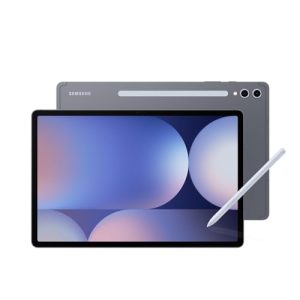
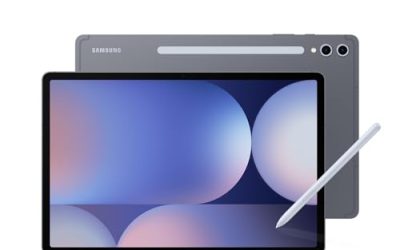
The Galaxy Tab S10+ is the balanced choice in this guide. Its 12.4-inch Dynamic AMOLED 2X display lists a resolution of 2800 x 1752 with an adaptive refresh rate of up to 120 Hz, which keeps text sharp and ink close to the pen tip. The listing shows 12 GB of RAM, 256 GB of storage, and a 10,090 mAh battery, and the MediaTek Dimensity 9300+ processor is the same chip used in the larger Ultra model. The S Pen is included in the box, and the tablet is the US version in Moonstone Gray with Wi-Fi connectivity.
Consideration: the 12.4-inch screen shows a full page at a slightly smaller size than the 14.6-inch Ultra, so readers who work with dense documents may zoom more often.
Samsung Galaxy Tab S9+ — ASIN B0C4BBNP7R
- Best for: readers who want the 12.4-inch screen size and the Snapdragon processor at a lower tier than the current generation.
readers who want the 12.4-inch screen size and the Snapdragon processor at a lower tier than the current generation.
The Galaxy Tab S9+ is the established 12.4-inch option in this guide. Its Dynamic AMOLED 2X display lists a resolution of 2800 x 1752, and the listing shows a Qualcomm Snapdragon 8 Gen 2 processor with 12 GB of RAM and 256 GB of storage. The S Pen is included in the box, and the tablet lists a microSD card slot for additional storage. The US version in Graphite connects over Wi-Fi, and the listing describes a durable design with a long battery life.
Consideration: it is a 2023 model, so its processor and connectivity are a generation behind the Tab S10+ and Tab S11, even though the screen and stylus experience remain close.
Samsung Galaxy Tab S11 — ASIN B0FGKN976K
- Best for: annotators who carry their tablet everywhere and want the newest processor and the longest software support in the smallest body.
annotators who carry their tablet everywhere and want the newest processor and the longest software support in the smallest body.
The Galaxy Tab S11 is the newest and most portable tablet in this guide. Its 11-inch Dynamic AMOLED 2X display lists a resolution of 2560 x 1600 with a refresh rate of up to 120 Hz, and the listing shows a MediaTek Dimensity 9400+ processor with 12 GB of RAM and 256 GB of storage. The S Pen is included in the box, with a redesigned hexagonal body shaped like a classic pencil, and the listing shows microSD expansion up to 2 TB. The tablet lists an 8,400 mAh battery, 45 W charging, and an IP68 rating, and the listing notes up to 7 years of security updates.
Consideration: the 11-inch screen is the smallest in this guide, so a full document page displays at a smaller size and may need more zooming than the 12.4-inch and 14.6-inch models.
Which One Is Right for You?
Choose the Galaxy Tab S10 Ultra if the tablet will stay on a desk and the priority is seeing a whole page at once with the sharpest text in the group. Choose the Galaxy Tab S10+ if the tablet needs to travel and the priority is a balance of screen size, battery capacity, and portability. Choose the Galaxy Tab S9+ if the 12.4-inch size is right and the older generation meets the needs of the annotation workflow. Choose the Galaxy Tab S11 if portability matters most and the newest processor, the longest listed software support, and the smallest body are the deciding factors.
For document annotation specifically, screen size and stylus quality matter more than raw processing power, since PDF readers and note apps are light workloads. All four tablets share the same core strengths: an OLED panel, an included S Pen, 12 GB of RAM, and 256 GB of storage. The decision comes down to how large the screen should be and how much the tablet will be carried.
Frequently Asked Questions
Do all of these tablets include a stylus?
Yes. The listings for all four tablets show an S Pen included in the box. The Tab S11 ships with a redesigned hexagonal S Pen, while the Tab S10 Ultra, Tab S10+, and Tab S9+ ship with the earlier S Pen design. No separate stylus purchase is listed as required for annotation on any of these models.
Is an OLED screen better than an LCD screen for reading documents?
An OLED panel lights each pixel individually, which produces deep blacks and strong contrast between text and the page background. The listings in this guide all describe Dynamic AMOLED 2X panels, which is Samsung’s name for its OLED tablet displays. For long reading sessions, the strong contrast keeps text legible at lower brightness settings.
Can these tablets open and annotate PDF files?
Yes. As Android tablets, they run PDF readers and note apps from the app store, and the included S Pen works with those apps for handwriting, underlining, and highlighting. The specific apps and their annotation features are set by the app makers, not by the tablet listing, so check the app’s listed features before choosing one.
How much storage do I need for documents?
All four tablets list 256 GB of internal storage, which holds a large library of PDF documents and notes. The Tab S9+ and Tab S11 list a microSD card slot for extra storage, with the Tab S11 listing support for cards up to 2 TB and the Tab S9+ listing support for up to 1 TB. Document files are small compared with video, so 256 GB covers most annotation libraries.
Does a larger screen drain the battery faster?
A larger screen uses more power at the same brightness, but the larger tablets in this guide also list larger batteries. The Tab S10+ lists a 10,090 mAh battery and the Tab S11 lists an 8,400 mAh battery, and both are sized to their screens. Brightness has a larger effect on runtime than screen size alone, so lowering brightness extends a reading session on any of these models.
Which tablet is best for annotating with the tablet held in one hand?
The Galaxy Tab S11 is the smallest and lightest of the four, with an 11-inch screen, so it is the easiest to hold one-handed while annotating with the other hand. The 12.4-inch models are a middle ground, and the 14.6-inch Tab S10 Ultra is best used on a desk or a stand rather than held for long periods.
Bottom Line
For document annotation, the Galaxy Tab S10 Ultra is the strongest choice when screen size is the priority, with its 14.6-inch Dynamic AMOLED 2X display and included S Pen. The Galaxy Tab S11 is the best portable choice, with the newest processor, the longest listed software support, and the smallest body in the group. The Galaxy Tab S10+ sits between them as the balanced option, and the Galaxy Tab S9+ remains a solid 12.4-inch choice for readers who do not need the newest generation. Any of the four will handle annotation well, since all share an OLED panel, an included stylus, 12 GB of RAM, and 256 GB of storage; the right one depends on how large the screen should be and how far the tablet has to travel.
Disclosure: As an Amazon Associate, this site earns from qualifying purchases.
More from Amazon
Programs that pair well with the guide above. Offers and eligibility are set by Amazon and may change.
A free business account with business pricing and bulk-buying tools for work, shop or home office.
Create a business accountFree shipping on eligible items, Prime Video and more. Eligible new members can start with a free trial.
Start a Prime free trialAudiobooks and podcasts to listen to on the go. Eligible new members can start with a free trial.
Try Audible freeAd-free music streaming. Eligible new subscribers can start with a free trial.
Try Music Unlimited freeAs an Amazon Associate we earn from qualifying purchases.




Write Your Review
No reviews yet. Be the first to share your experience!