

Key takeaways
- Three OLED Android tablets with a stylus in the box for handwritten notes, compared on screen size, display type, pen and storage from their Amazon listings.
Handwritten notes narrow the Android tablet market brutally fast. You need two things at once: an OLED screen, because its contrast keeps handwriting crisp and readable in dim lecture halls and bright cafés alike, and a proper active stylus, because writing with a fingertip or a rubber-tipped stick is not handwriting at all. Most Android tablets fail one test or the other, offering a nice LCD with a pen, or an OLED panel with no serious stylus support. The shortlist of devices that pass both is short, and it is dominated by one family.
This guide is for students digitizing lecture notes, professionals who annotate documents by hand, and journalers who want paper-like writing without paper. All three tablets below are current Amazon US listings, each with an AMOLED display stated in the listing and a stylus included in the box, and every specification quoted here is taken from those listings, including model numbers, so you can be sure the variant you order is the one described.
Quick Picks
As an Amazon Associate we earn from qualifying purchases.
| Product | Best for | Key spec from title |
|---|---|---|
| Samsung Galaxy Tab S9 | Carrying all day between classes | 11-inch Dynamic AMOLED 2X, S Pen included |
| Samsung Galaxy Tab S9+ | Split-screen notes beside source material | 12.4-inch Dynamic AMOLED 2X, 256GB |
| Samsung Galaxy Tab S10+ | The newest model with glare reduction | 12.4-inch AMOLED 2X, anti-reflection display |
How to Choose
Screen size is a handwriting decision, not just a viewing one
An 11-inch tablet approximates a sheet of A5 paper: comfortable to hold in one hand, easy to write on at a desk or on your lap, and light enough to carry everywhere. A 12.4-inch screen approaches A4, which changes what you can do. You can split the display between a textbook or PDF on one side and your notebook on the other and still write at a natural size. If your notes are mostly quick captures and annotations, the smaller screen serves you better. If you write full pages or work side by side with source material, the larger canvas earns its extra weight.
Confirm the stylus is in the box and how it works
For handwriting, the pen matters as much as the panel. Check three things on the listing. First, whether a stylus is actually included or merely supported, because a supported-but-separate pen is an extra purchase and an easy detail to miss. Second, whether the pen needs charging or pairing; the S Pen in these listings works without a battery for writing, so it never dies mid-lecture. Third, how the pen stores: a magnetic strip on the back keeps it attached in a bag far better than a loose pen in a pocket. Pressure sensitivity and palm rejection are what make digital ink feel like handwriting rather than drawing with a mouse.
OLED traits that matter for notes specifically
Refresh rate affects handwriting more than video. A 120 Hz panel redraws the ink trail faster, so the line appears under the pen tip with less visible lag, which is the difference between writing that feels connected and writing that feels like dragging a tail. Contrast is the other note-specific trait: OLED pixels switch fully off, so black ink on a white page, or white ink on a dark page at night, stays sharp without the grey haze of a backlit LCD. Anti-reflection coatings, offered on the newest model here, cut glare from windows and overhead lights during long writing sessions.
Storage, memory and update life for a multi-year tool
Notes accumulate. A semester of handwritten notebooks with embedded images and exported PDFs is not huge, but the tablet also carries your apps, reading material and media. Listings here start at 128GB and go to 256GB, and the practical difference is how often you have to tidy up. Memory affects split-screen writing: more RAM keeps a heavy PDF and your notes app both alive when you switch between them. Finally, consider the model’s age. A newer tablet receives Android and security updates for longer, which matters for a device you plan to write on for three or four years.
The 3 Best Options
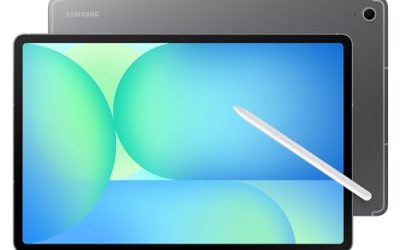
Samsung Galaxy Tab S9

The 11-inch Tab S9 is the portable member of this shortlist and the easiest to recommend for students. Its Dynamic AMOLED 2X screen runs at 120 Hz with a 2560 x 1600 resolution, so ink stays sharp and responsive, and the S Pen is in the box, battery-free for writing and magnetically stored on the back. The Snapdragon 8 Gen 2 processor is well beyond what note apps demand, leaving headroom for split-screen work. An IP68 rating for the tablet and pen means a spilled coffee or a rainy walk between buildings is an annoyance, not a disaster.
Specs
- 11-inch Dynamic AMOLED 2X display, 2560 x 1600, 120 Hz
- Qualcomm Snapdragon 8 Gen 2 processor
- 128GB storage
- S Pen included, no charging needed for writing
- IP68 water and dust resistance
- Model SM-X710NZAAXAR, US version, Graphite
Best for: Students and mobile professionals who write notes in many places and carry the tablet all day.
Watch out for: The 128GB storage is the smallest here; heavy media libraries will push you toward the larger variants on the same listing.
ASIN: B0C4BC6R95
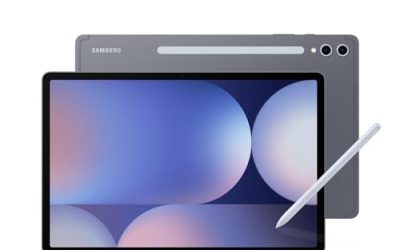
Samsung Galaxy Tab S9+
The Tab S9+ stretches the same formula to 12.4 inches and doubles the storage to 256GB. That screen, at 2800 x 1752, is the one to pick if your note-taking happens beside the material you are studying: a PDF or slide deck on one half, your handwriting on the other, both legible at once. It keeps the 120 Hz AMOLED panel, the included battery-free S Pen and the IP68 build of the smaller model, on the same Snapdragon 8 Gen 2 platform. For desk-based study sessions and document annotation, the extra width is worth more than any other specification on this page.
Specs
- 12.4-inch Dynamic AMOLED 2X display, 2800 x 1752, 120 Hz
- Qualcomm Snapdragon 8 Gen 2 processor
- 256GB storage
- S Pen included, no charging needed for writing
- IP68 water and dust resistance
- Model SM-X810NZAAXAR, US version, Graphite
Best for: Note-takers who work split-screen with textbooks, slides or PDFs beside their handwriting.
Watch out for: The larger body is a two-handed carry and fills a small bag; if you mostly write on the move, the 11-inch model is easier to live with.
ASIN: B0C4BBNP7R
Samsung Galaxy Tab S10+

The Tab S10+ is the current generation of the same idea: a 12.4-inch Dynamic AMOLED 2X screen, an S Pen in the box, and two updates that matter for writers. The display adds an anti-reflection treatment, which makes a genuine difference when you write under office lighting or near windows for hours. Inside, a MediaTek Dimensity 9300+ processor and 12GB of memory keep split-screen note sessions fluid, and as the newest model here it has the longest software update runway ahead of it. Choose this one if the tablet is a multi-year primary tool rather than a course-length purchase.
Specs
- 12.4-inch Dynamic AMOLED 2X display with anti-reflection
- MediaTek Dimensity 9300+ processor
- 12GB memory, 256GB storage
- S Pen included for note-taking
- Model SM-X820NZAAXAR, US version, Moonstone Gray
Best for: Professionals and long-term students who write daily and want the newest hardware and update support.
Watch out for: It changes processor platform from the S9 generation; if your workflow depends on a specific app, confirm that app’s tablet support before switching.
ASIN: B0D84MHZX5
Which One Fits Your Situation
You are a student moving between lectures all day
Choose the Galaxy Tab S9. The 11-inch body disappears into a bag, the battery-free pen is always ready when a lecture starts, and the AMOLED screen keeps your notes readable from a bright hall seat to a dim library corner. It is the only one of the three you will forget you are carrying.
You study with the book open next to your notes
Choose the Galaxy Tab S9+. Split-screen is where its 12.4-inch screen justifies itself: source material on one side at full legibility, your handwriting on the other at natural size. The 256GB of storage also swallows a degree’s worth of PDFs, slides and exported notebooks without housekeeping. Your future self will thank the extra storage every time a new course adds its own library of material.
You annotate documents and write in bright offices
Choose the Galaxy Tab S10+. The anti-reflection display is the deciding feature for long writing sessions under artificial light, and the newer hardware gives you the longest update life. It is the same writing experience as the S9+, refined for the environments professionals actually sit in. If you present or mark up documents in meeting rooms all day, that glare control is worth more than a spec-sheet upgrade.
You are replacing paper notebooks entirely
Any of the three works, so decide by size. All share the same pen, the same note ecosystem and the same display technology. Pick the 11-inch S9 if your notebook travels with you everywhere, and one of the 12.4-inch models if your writing mostly happens at a desk with reference material open beside it.
Common Mistakes
- Buying an OLED tablet that only supports a stylus, then discovering the pen is a separate purchase.
- Choosing a capacitive rubber-tip stylus for handwriting; without pressure sensitivity and palm rejection, notes stay crude.
- Picking screen size by video habits instead of by how you actually write and whether you split the screen.
- Ignoring storage because notes are small, then filling the tablet with PDFs, recordings and media in a year.
- Assuming every variant on a listing is identical; check the model number so the storage and color you receive match the description.
Frequently Asked Questions
Why insist on OLED for handwritten notes?
OLED panels turn individual pixels fully off, which gives handwriting true black-on-white contrast and keeps fine strokes crisp at small sizes. The technology also pairs here with 120 Hz refresh rates, so the ink trail follows the pen tip closely. For hours of reading and writing, that contrast and responsiveness are easier on the eyes than a typical LCD.
Do I need to charge the S Pen?
No. On all three tablets here, the included S Pen writes without a battery and never needs charging to take notes, which removes the classic failure of a dead stylus before an exam. It attaches magnetically to the back of the tablet for storage and transport. Some advanced remote features on Samsung pens use a small charge, but handwriting itself does not.
Can I convert my handwriting to text on these tablets?
Yes. Samsung’s notes software on these models can convert handwritten pages to typed text, search your handwriting, and export notebooks as PDF or document files. That is a large part of the value over paper: the page stays handwritten while you write it, but becomes searchable and shareable afterward. Check the listing’s software description for the exact features of the current version.
Is 128GB enough for a notes tablet?
For notes alone, easily: handwritten notebooks are small files. The pressure comes from everything else the tablet accumulates, such as textbooks, lecture recordings, apps and media. If this will be your only tablet for several years, the 256GB models in this guide give you comfortable headroom. If it is purely a notebook replacement, 128GB is a rational saving.
More from Amazon
Programs that pair well with the guide above. Offers and eligibility are set by Amazon and may change.
A free business account with business pricing and bulk-buying tools for work, shop or home office.
Create a business accountFree shipping on eligible items, Prime Video and more. Eligible new members can start with a free trial.
Start a Prime free trialAudiobooks and podcasts to listen to on the go. Eligible new members can start with a free trial.
Try Audible freeAd-free music streaming. Eligible new subscribers can start with a free trial.
Try Music Unlimited freeAs an Amazon Associate we earn from qualifying purchases.
Write Your Review
No reviews yet. Be the first to share your experience!