

Key takeaways
- Compare five Android tablets built for document annotation, with included S Pens, 3K displays and one pick where the stylus is sold separately.
Annotating documents on a tablet comes down to two things most listings bury: whether a stylus is actually in the box, and whether a full page stays legible without pinch-zooming every paragraph. A big screen with a pen sold separately, or a sharp display paired with cramped storage, turns markup sessions into workarounds. The five tablets below all run Android, all measure 11.2 inches or more, and all support pen input, but they split sharply on pen inclusion, resolution and expansion.
This roundup serves contract reviewers redlining agreements, students marking lecture slides and readings, and field staff signing off inspection reports on the move. Every pick was chosen from the names and specifications published on its Amazon page, so pen status, screen figures and storage details below reflect what each listing itself states, including the one model where the stylus is supported yet absent from the box.
Quick Picks
As an Amazon Associate we earn from qualifying purchases
| Product | Best for | Key spec from title |
|---|---|---|
| Samsung Galaxy Tab S10 FE+ | Annotating long PDFs on the largest screen | 13.1-inch display, S Pen included |
| Samsung Galaxy Tab S9 FE+ | Everyday markup with room to expand storage | 12.4-inch display, S Pen included |
| Lenovo Tab P12 | Split-screen document review | 12.7-inch 3K display, Tab Pen Plus included |
| Lenovo Idea Tab Pro | Students marking up class materials | 12.7-inch 3K display, pen and folio included |
| Xiaomi Pad 7 | A sharp, fast screen if you buy the pen separately | 11.2-inch 3.2K display, 144 Hz refresh |
How to Choose
Screen Size and Resolution Decide Page Readability
Annotation lives or dies on whether a full document page fits the screen at a readable size. The smallest display here measures 11.2 inches, while the largest reaches 13.1 inches, and that gap changes how often you zoom during a review session. Resolution matters alongside raw size: the Lenovo models and the Xiaomi list 3K-class panels, so fine print in contracts and footnotes stays crisp, whereas the Samsung FE models trade a little sharpness for larger physical dimensions. Match the panel to your documents first: dense spreadsheets and legal pages reward width, while lighter reading tolerates the compact option.
Pen Inclusion Changes the Real Cost of Starting
Four of these five listings put a pen in the box, so annotation can start the day the tablet arrives. The exception is the Xiaomi Pad 7: its listing states stylus support and names a compatible pen, yet the box contains only a manual and a USB Type-C cable, so the pen is a separate purchase. Samsung bundles its S Pen with both FE models, and both Lenovo listings include a pen as well. Before ordering, open the box-contents field on the listing rather than trusting headline photos, because support and inclusion are different claims.
Storage and Expansion for a Growing Document Library
Marked-up contracts, scanned manuals and annotated course packs accumulate quickly, so storage planning matters more than buyers expect. Four picks here ship with 128 GB, while the Xiaomi Pad 7 lists 256 GB. Expansion separates them further: the Samsung Tab S9 FE+ title states expandable storage outright, whereas the Xiaomi listing states there is no SD slot at all, fixing its capacity at purchase. The remaining listings do not promise expansion in the data retrieved, so treat their internal storage as the ceiling and size your document archive accordingly before choosing.
Battery Figures and Build for Working Away From a Desk
Listings state endurance unevenly, which makes direct comparison tricky. Lenovo credits the Tab P12 with up to 10 hours, Xiaomi prints an 8850 mAh battery in the Pad 7 title, and Samsung describes the Tab S10 FE+ battery as long life without a capacity figure in the data retrieved. Build details are firmer: the S10 FE+ carries an IP68 water-resistant rating, useful around site visits and coffee spills. Weigh stated endurance against your longest annotation day, and favour a rated, sealed body if documents follow you outdoors.
The 5 Best Options
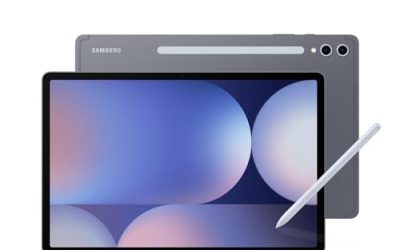
Samsung Galaxy Tab S10 FE+

The largest display in this group belongs to Samsung’s Tab S10 FE+, and that extra width suits readers who keep a full contract page on screen while writing in the margins. Its listing pairs the 13.1-inch panel with an included S Pen, so margin notes, underlining and signature-style markups need no extra order. An Exynos 1580 processor and 8 GB of memory handle document apps, while the IP68 water-resistant body tolerates site visits, kitchen counters and other places paper files would never survive.
Specs
- Display: 13.1 inches, 2880 x 1800 resolution, 90 Hz refresh rate
- Processor: Exynos 1580
- Memory and storage: 8 GB RAM, 128 GB storage
- Stylus: S Pen included in the box
- Build: IP68 water-resistant
- Model: SM-X620NZANXAR, 2025 model year, US Version, Gray
Best for: Readers who annotate long PDFs and want the widest page view with the pen included.
Watch out for: Confirm you are ordering the 128 GB Gray US Version, since sibling listings cover other storage sizes and colours under the same model name.
ASIN: B0DVZY44YR
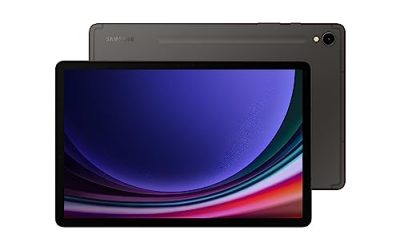
Samsung Galaxy Tab S9 FE+

Samsung’s earlier FE+ remains a strong annotation pick for buyers who value expansion over the newest panel. The 12.4-inch screen still shows a full page comfortably, the S Pen is included, and the title explicitly promises expandable storage, which matters once annotated archives grow past the internal 128 GB. With 8 GB of memory and 802.11ax wireless, it covers document work, cloud syncing and video calls around a markup session without forcing compromises elsewhere.
Specs
- Display: 12.4 inches, 2560 x 1600 resolution
- Processor: 2.4 GHz as listed
- Memory and storage: 8 GB RAM, 128 GB storage, expandable storage stated in the title
- Camera: 8MP camera
- Wireless: 802.11ax
- Stylus: S Pen included in the box
- Model: SM-X610NZAAXAR, 2023 model year, US Version, Gray
Best for: Annotators whose document library keeps growing and who want storage headroom.
Watch out for: This is the 2023 model year listing, so confirm the configuration and colour on the live page, because a 256 GB sibling listing exists.
ASIN: B0CCBWYZKY
Lenovo Tab P12

Lenovo’s Tab P12 leans into reading comfort, pairing a 12.7-inch 3K display with the included Tab Pen Plus, whose listing states tilt detection and palm rejection for natural margin writing. The 2944 x 1840 resolution keeps small print legible when a page is shown whole, and quad JBL speakers with Dolby Atmos help when annotated material includes recorded briefings. Android 13, a Dimensity 7050 processor and up to 10 hours of stated battery life round out a document-first package.
Specs
- Display: 12.7 inches, 3K LCD, 2944 x 1840 resolution
- Processor: MediaTek Dimensity 7050
- Memory and storage: 8 GB RAM, 128 GB storage
- Operating system: Android 13
- Camera: 13MP camera
- Audio: quad JBL speakers with Dolby Atmos
- Battery: up to 10 hours as listed
- Stylus: Lenovo Tab Pen Plus included, with tilt detection and palm rejection
- Model: ZACH0177US
Best for: Reviewers who read dense pages whole and annotate with a pen that supports palm rejection.
Watch out for: Availability signals for this US listing are dated, so confirm a live buy option and that the Tab Pen Plus is in the box before ordering.
ASIN: B0CKC3RTJH
Lenovo Idea Tab Pro

The Idea Tab Pro is the student-leaning entry here: Lenovo’s listing pitches its included pen directly at annotating class materials and documents, and a folio case rides along in the box for carrying between lectures. The 12.7-inch 3K LCD matches the Tab P12 on page real estate, while a Dimensity 8300 processor sits a step above the P12 chip on paper. Buyers comparing the two Lenovos are really choosing between the P12’s stated battery figure and this model’s newer processor and bundled case.
Specs
- Display: 12.7 inches, 3K LCD
- Processor: MediaTek Dimensity 8300
- Memory and storage: 8 GB RAM, 128 GB storage
- Stylus: pen included in the box
- Included extras: folio case included
- Model: TB373FU, Luna Grey
Best for: Students who annotate readings daily and want the pen and a carry case in one box.
Watch out for: The listing’s own fields name the included pen two different ways, so verify the exact pen model shown on the live page before ordering.
ASIN: B0F1NGFSNY
Xiaomi Pad 7

Xiaomi’s Pad 7 brings the sharpest, fastest panel in this roundup: an 11.2-inch 3.2K display running up to 144 Hz, driven by a Snapdragon 7+ Gen 3 with 256 GB of storage, double the internal space of the other picks. The catch sits in the box contents. The listing states stylus support and names the Xiaomi Stylus Pen as compatible, yet ships only a manual and a USB Type-C cable, so annotation requires a separate pen purchase before the first markup.
Specs
- Display: 11.2 inches, 3.2K, 3200 x 2136 resolution, up to 144 Hz refresh
- Processor: Snapdragon 7+ Gen 3
- Memory and storage: 8 GB RAM, 256 GB storage
- Battery: 8850 mAh
- Connectivity: Bluetooth 5.4, WiFi only, no SIM or SD slot as listed
- Camera: 13 MP camera
- Audio: four speakers
- Stylus: supported, NOT included; box contains a manual and a USB Type-C cable only
- Model: 2410CRP4CG, Global Version, Blue
Best for: Readers who prize screen sharpness and refresh speed and are happy to add the pen separately.
Watch out for: No stylus is included and there is no SD slot, so budget for the Xiaomi Stylus Pen and treat the 256 GB as fixed.
ASIN: B0DY6SHVPM
Which One Fits Your Situation
You Redline Long Reports Far From Your Desk
The Tab S10 FE+ fits this routine best. Its 13.1-inch screen shows a full page without shrinking the margins you write in, the S Pen is already in the box, and the IP68 water-resistant body shrugs off site cabins, trains and kitchen tables. Nothing else here combines that screen size, bundled pen and sealed build in one listing.
You Annotate Lectures and Course Readings Daily
Choose the Lenovo Idea Tab Pro. Lenovo’s listing aims its included pen squarely at annotating class materials, the folio case is already in the box for the trip between lectures, and the 12.7-inch 3K screen keeps a textbook page readable while notes run down the side. The Dimensity 8300 also gives it the newer processor of the two Lenovo picks.
You Review Contracts Side by Side With Notes
The Lenovo Tab P12 suits contract work. Its 2944 x 1840 panel keeps clauses legible when a document sits beside your notes, and the included Tab Pen Plus states tilt detection and palm rejection, so a resting hand does not fight the pen. The stated battery life of up to 10 hours also covers a full review day away from a charger.
You Want the Sharpest Screen and Will Add a Pen
Pick the Xiaomi Pad 7. Its 3.2K panel runs at up to 144 Hz, so pages scroll smoothly and fine print stays crisp, and its 256 GB of storage doubles the other picks. Just order the Xiaomi Stylus Pen alongside it, because the listing supports a stylus without including one, and there is no SD slot for later expansion.
Common Mistakes
- Assuming a stylus is in every box: four of these listings include a pen, but the Xiaomi Pad 7 only supports one, so check the box-contents field before ordering.
- Judging screens by inches alone: a 12.7-inch 3K panel can show finer print than a larger, lower-resolution display, so compare the resolution figures too.
- Ignoring expansion until the archive grows: the Xiaomi lists no SD slot, while the Tab S9 FE+ states expandable storage outright.
- Ordering the wrong regional version: sibling listings cover international and other-storage variants, so confirm the US Version or US model code on the page.
- Skipping the included-extras check: pen names and bundled cases differ between listings, and one Lenovo listing names its own pen two different ways.
Frequently Asked Questions
Does every tablet here include a stylus in the box?
No. The two Samsung models include the S Pen, and both Lenovo listings include a pen, but the Xiaomi Pad 7 only supports a stylus. Its box contains a manual and a USB Type-C cable, so the compatible Xiaomi Stylus Pen is a separate purchase. Always check the box-contents field on the listing before assuming a pen is bundled.
Which screen size suits full-page PDF annotation best?
Bigger panels reduce zooming: the 13.1-inch Tab S10 FE+ shows the most page at once, with the 12.7-inch Lenovo models close behind. Resolution matters too, since the 3K displays keep small print crisp at full-page width. The 11.2-inch Xiaomi stays workable for annotation, especially given its 3200 x 2136 resolution, but dense pages will need more zooming there.
Can I expand the storage on these tablets later?
Only one listing promises it outright: the Samsung Tab S9 FE+ title states expandable storage. The Xiaomi Pad 7 goes the other way, stating no SD slot, so its 256 GB is fixed. The other listings do not state expansion in the data retrieved, so plan as if their 128 GB is the ceiling for your document archive.
Are these the US versions of each tablet?
Both Samsung listings state US Version in their titles, and the Lenovo Tab P12 model code ZACH0177US marks the US configuration. The Xiaomi Pad 7 is listed as a Global Version WiFi model instead, which still suits document work but is worth knowing before ordering. Sibling listings in other regions and storage sizes exist for several models here.
More from Amazon
Programs that pair well with the guide above. Offers and eligibility are set by Amazon and may change.
A free business account with business pricing and bulk-buying tools for work, shop or home office.
Create a business accountFree shipping on eligible items, Prime Video and more. Eligible new members can start with a free trial.
Start a Prime free trialAudiobooks and podcasts to listen to on the go. Eligible new members can start with a free trial.
Try Audible freeAd-free music streaming. Eligible new subscribers can start with a free trial.
Try Music Unlimited freeAs an Amazon Associate we earn from qualifying purchases.

Write Your Review
No reviews yet. Be the first to share your experience!