

Our Short List of 3

- Best for: Students and hybrid workers who want a big pen canvas that still fits a daily bag.
- Display: 12.4-inch AMOLED 2X
- Storage: 256 GB
- Pen: S Pen included
- Features: Galaxy AI tools and Circle to Search, per the listing title
- Best for: Note-takers who want flagship pen performance in the smallest, most holdable size.
- Display: 11-inch Dynamic AMOLED 2X, 2560 x 1600, 120 Hz
- Processor: Snapdragon 8 Gen 2
- Storage: 256 GB
- Pen: S Pen included

- Best for: Media lovers and readers who want the smoothest OLED panel and will add the pen for notes.
- Display: 12.3-inch OLED, 3000 x 1920, 144 Hz
- Memory: 12 GB RAM
- Storage: 256 GB
- Battery: 10,050 mAh
All 3 Picks at a Glance
| Product | Specs | Action |
|---|---|---|
| Samsung Galaxy Tab S10+ |
| Check price on Amazon |
| Samsung Galaxy Tab S9 |
| Check price on Amazon |
| HONOR MagicPad2 |
| Check price on Amazon |
Key takeaways
- Four OLED Android tablets with active pen support compared, from a 14.6-inch desk slate to an 11-inch note-taker, with specs from Amazon listings.
Buying an Android tablet for pen work is really a decision about the pen system first and the screen second. Plenty of tablets accept a cheap capacitive stylus, but only a small group pairs a true OLED panel with an active pen that supports pressure sensitivity and palm rejection. Inside that group, the real questions are whether the pen is in the box or an extra purchase, and whether the screen size suits a desk, a lecture seat, or a couch.
This roundup is for students who handwrite notes all day, artists who sketch and annotate, and professionals who mark up documents on screen. Every tablet below has a genuine OLED display and active pen support, and each one was chosen from the name and specifications printed on its Amazon product page, so the panel types, pen arrangements, and storage figures here match what the listings themselves state.
Quick Picks
As an Amazon Associate we earn from qualifying purchases.
| Product | Best for | Key spec from title |
|---|---|---|
| Samsung Galaxy Tab S10 Ultra | Desk-based drawing and split-screen work | 14.6-inch AMOLED display, S Pen included |
| Samsung Galaxy Tab S10+ | A large canvas that still travels well | 12.4-inch AMOLED 2X display, 256 GB storage |
| Samsung Galaxy Tab S9 | Handwritten notes in lectures and meetings | 11-inch Dynamic AMOLED 2X, Snapdragon 8 Gen 2 |
| HONOR MagicPad2 | Smooth scrolling and media on a mid-size OLED | 12.3-inch 144Hz OLED display, 10,050 mAh battery |
How to Choose
Start With the Pen, Not the Screen
The pen arrangement decides your real cost and your daily friction. Samsung’s S Pen ships in the box with the Tab S10 Ultra, Tab S10+, and Tab S9, needs no charging for writing, and attaches magnetically to the tablet. The HONOR MagicPad2 supports an active stylus too, but its Magic-Pencil is a separate purchase, so the tablet alone does not complete the setup. Also check what the pen system actually offers: pressure levels, tilt support, and palm rejection matter far more for drawing and handwriting than a long list of shortcut buttons.
Match Screen Size to Where You Actually Work
Screen size changes how the pen feels in practice. A 14.6-inch panel like the Tab S10 Ultra gives artists a near-paper canvas and leaves room for a reference image beside the sketch, but it is a two-handed, desk-first device. At 12.3 to 12.4 inches, the MagicPad2 and Tab S10+ balance canvas space against bag weight. The 11-inch Tab S9 is the one you can hold in one hand while writing with the other. Pick the size around your dominant use, not the biggest number.
Check the Chip, RAM, and Storage Behind the Panel
An OLED screen cannot rescue a slow tablet once your notes app holds hundreds of pages or your drawing app stacks dozens of layers. The listings here run capable processors, from the Snapdragon 8 Gen 2 in the Tab S9 to the Dimensity 9300+ in the Tab S10 Ultra, and the configurations listed carry 12 GB of RAM on the larger models. Storage deserves the same attention: 256 GB fills quickly with scanned documents and media, so confirm the exact storage tier on the listing before ordering.
Look at Software Support and the Extras You Will Pay For
A pen tablet is a multi-year tool, so update policy matters. Samsung’s recent Galaxy Tab models carry long software support windows and DeX, which turns the tablet into a desktop-style workspace with windows and a taskbar. Then total up the extras honestly: a keyboard cover, a spare pen, or a replacement nib set can change which tablet is actually the cheaper complete kit. Read the listing’s box contents line rather than assuming the pen, charger, and cover are all included.
The 4 Best Options
Samsung Galaxy Tab S10 Ultra
The Tab S10 Ultra is the closest thing here to a digital drafting table. Its 14.6-inch Dynamic AMOLED 2X panel gives drawing apps a wide, color-rich canvas, and the anti-reflection finish listed by Samsung helps under bright room lighting. The S Pen is included, so handwriting and sketching start the moment you unbox it. With the Dimensity 9300+ chip and 12 GB of RAM in this configuration, split-screen work — a document on one side, notes on the other — stays fluid. It suits people who work at a desk far more than people who read in bed.
Specs
- Display: 14.6-inch Dynamic AMOLED 2X with anti-reflection coating
- Processor: MediaTek Dimensity 9300+
- Memory: 12 GB RAM
- Storage: 256 GB
- Pen: S Pen included in the box
- Model: SM-X920N, Wi-Fi, Gray
Best for: Artists and professionals who want the largest pen canvas Android offers.
Watch out for: The size and weight make one-handed use unrealistic, and the keyboard cover is a separate accessory on most listings.
ASIN: B0DJ5796F6
Samsung Galaxy Tab S10+
- Best for: Students and hybrid workers who want a big pen canvas that still fits a daily bag.
- Display: 12.4-inch AMOLED 2X
- Storage: 256 GB
- Pen: S Pen included
- Features: Galaxy AI tools and Circle to Search, per the listing title
Students and hybrid workers who want a big pen canvas that still fits a daily bag.
Listings split by color and storage, so confirm the variant in the title before checkout.
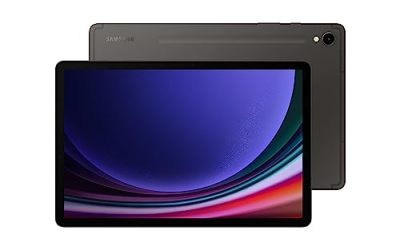
The Tab S10+ keeps the same formula in a more portable frame. The 12.4-inch AMOLED 2X screen is still generous for two-column notes, annotated PDFs, and side-by-side apps, yet the tablet is noticeably easier to carry between rooms or meetings than the Ultra. The S Pen is included for note-taking, and the listing highlights Galaxy AI tools and Circle to Search, which pair well with handwritten study notes. This 256 GB US Version in Moonstone Gray is the balanced pick for buyers who found the Ultra impressive but oversized for daily travel.
Samsung Galaxy Tab S9
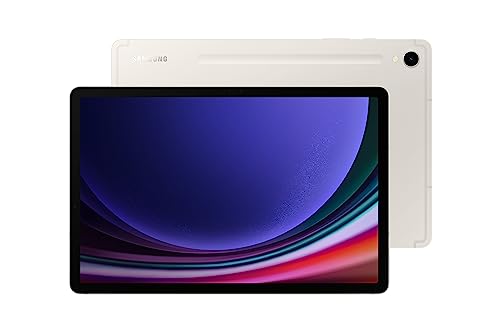
- Best for: Note-takers who want flagship pen performance in the smallest, most holdable size.
- Display: 11-inch Dynamic AMOLED 2X, 2560 x 1600, 120 Hz
- Processor: Snapdragon 8 Gen 2
- Storage: 256 GB
- Pen: S Pen included
Note-takers who want flagship pen performance in the smallest, most holdable size.
As a 2023 model, its remaining software update window is shorter than the Tab S10 generation.
The Tab S9 is the compact note-taker of the group. Its 11-inch Dynamic AMOLED 2X display runs at 2560 x 1600 with a 120 Hz refresh rate, so pen strokes track smoothly while the tablet stays light enough to hold during a lecture. The Snapdragon 8 Gen 2 still handles note apps, document markup, and media without hesitation, and the S Pen is included. Samsung also lists an IP68 rating for this model, unusual among tablets, which suits buyers who work in kitchens, workshops, or field settings where splashes are a real risk.
HONOR MagicPad2
- Best for: Media lovers and readers who want the smoothest OLED panel and will add the pen for notes.
- Display: 12.3-inch OLED, 3000 x 1920, 144 Hz
- Memory: 12 GB RAM
- Storage: 256 GB
- Battery: 10,050 mAh
Media lovers and readers who want the smoothest OLED panel and will add the pen for notes.
Budget for the Magic-Pencil separately, and check the listing’s warranty terms since HONOR’s US support network is smaller than Samsung’s.
The MagicPad2 is the non-Samsung route into OLED pen tablets. Its 12.3-inch OLED panel refreshes at 144 Hz, the fastest rate in this roundup, which makes pen strokes and scrolling feel especially direct. The listing specifies 12 GB of RAM, 256 GB of storage, and a large 10,050 mAh battery, and the display carries a 3000 x 1920 resolution with an eye-comfort focus. The catch is the pen: the tablet supports an active stylus, and the listing names stylus support among its input types, but HONOR’s Magic-Pencil is bought separately rather than included.
Which One Fits Your Situation
You Sketch, Paint, or Annotate PDFs for Hours
Choose the Galaxy Tab S10 Ultra. The 14.6-inch AMOLED canvas leaves room for toolbars, layers panels, and a reference photo beside your work, and the included S Pen means no extra purchase before you start. Its size is a commitment, but for desk-based creative sessions that size is exactly the point.
You Take Handwritten Notes All Day
Choose the Galaxy Tab S9. The 11-inch body is light enough to hold through lectures and meetings, the 120 Hz AMOLED keeps ink strokes close to the pen tip, and the S Pen is in the box. The Tab S10+ is the upgrade path if your notes regularly sit beside a textbook or slide deck.
You Mostly Read, Stream, and Browse
Choose the HONOR MagicPad2. The 144 Hz OLED panel makes long reading and scrolling sessions feel fluid, the deep blacks flatter films and comics alike, and the large battery suits travel days. You can add the Magic-Pencil later if note-taking becomes a habit, rather than paying for pen hardware on day one.
You Want a Laptop-Style Desk Setup
Choose the Galaxy Tab S10+. Paired with a keyboard cover, its 12.4-inch screen and DeX mode handle document work, email, and research in side-by-side windows, while the S Pen covers signatures and markup. It is the most convincing middle ground between a media tablet and a light work machine.
Common Mistakes
- Assuming every tablet in a flagship line has OLED — some siblings, such as FE models, use LCD panels, so verify the display type on the listing itself.
- Buying a generic capacitive stylus and expecting pressure sensitivity or palm rejection; active pen support is tied to each brand’s own pen system.
- Comparing tablet prices without adding the pen, when models like the MagicPad2 sell the stylus separately.
- Ignoring the storage and color variant in the listing title, then receiving a different configuration than intended.
- Choosing the largest screen for portability-driven work, then leaving it at home because it is awkward to hold.
Frequently Asked Questions
Does the S Pen need charging before I can write with it?
No. The S Pen included with the Galaxy Tab S9, S10+, and S10 Ultra writes and draws without a battery charge, because the tablet powers it through the screen. Only the optional Bluetooth remote features on some S Pen versions use a small internal cell, and basic pen input works regardless.
Can I use any active stylus on these tablets?
Generally no. Each tablet is built around its own pen system: Samsung models work with the S Pen, while the HONOR MagicPad2 pairs with HONOR’s Magic-Pencil. A third-party pen may draw basic lines if it mimics a finger, but pressure sensitivity and palm rejection usually require the matching brand pen.
Is OLED noticeably better than LCD for note-taking?
For pen work the difference shows up in contrast and response. OLED pixels switch faster and render true blacks, so dark mode notes look cleaner and ink stands out sharply against the page. LCD tablets can still write well, but the listings here were chosen specifically for OLED panels.
Do these tablets support palm rejection while writing?
Yes, that is a core part of active pen support on all four models. The digitizer tracks the pen separately from touch input, so you can rest your hand on the glass while writing or drawing. Rejection quality depends on the app as well, so test your main notes app early.
More from Amazon
Programs that pair well with the guide above. Offers and eligibility are set by Amazon and may change.
A free business account with business pricing and bulk-buying tools for work, shop or home office.
Create a business accountFree shipping on eligible items, Prime Video and more. Eligible new members can start with a free trial.
Start a Prime free trialAudiobooks and podcasts to listen to on the go. Eligible new members can start with a free trial.
Try Audible freeAd-free music streaming. Eligible new subscribers can start with a free trial.
Try Music Unlimited freeAs an Amazon Associate we earn from qualifying purchases.








Write Your Review
No reviews yet. Be the first to share your experience!