

Key takeaways
- Four Windows detachable tablets picked for creative travel, with pen-ready touchscreens, detachable keyboards and the specs that matter on the road.
Creative work on the road forces a specific trade: you need a screen you can draw, annotate and colour-check on, a keyboard that comes off when the tray table gets tight, and enough storage that a week of RAW files, layered documents and exported clips never triggers a panic delete in an airport lounge. A detachable Windows tablet answers that trade only when the pen support, display quality and processor platform all suit the apps you actually open.
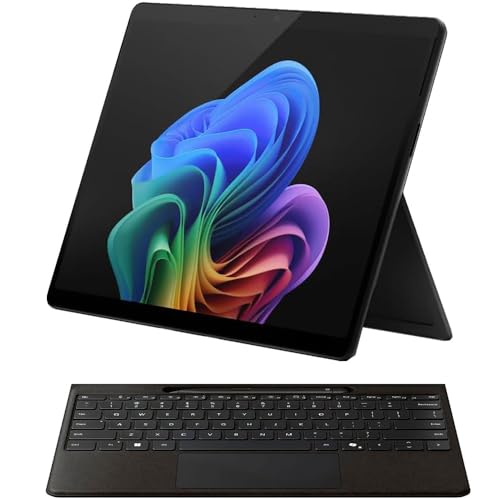

This guide is for travelling illustrators, photo editors, designers and writers who want one machine instead of a laptop plus a separate tablet. Every pick below is a genuine Windows detachable with a removable keyboard, chosen from the processor, memory, storage and display details printed in its Amazon product title and listing, so the differences you read here come from the listings themselves.
Quick Picks
As an Amazon Associate we earn from qualifying purchases
| Product | Best for | Key spec from title |
|---|---|---|
| Microsoft Surface Pro 11 Bundle (Snapdragon X Elite) | Most creative travellers who want the full kit in one box | 13″ OLED touchscreen, 16GB RAM, 1TB storage |
| ASUS ProArt PZ13 | Drawing and colour work away from a desk | 13.3″ 2.8K AMOLED touchscreen, Snapdragon X Plus |
| ASUS ROG Flow Z13 (2025) | Heavy creative apps and 3D work in a tablet body | Ryzen AI MAX+ 395, 32GB RAM, 1TB SSD |
| Microsoft Surface Pro 12-inch | The lightest carry for sketching and notes | 12″ touchscreen, Snapdragon X Plus, 512GB storage |
How to Choose
Check whether your creative apps run on the processor platform
Three of the machines here use Snapdragon X processors on Windows on ARM, while the ROG Flow Z13 uses an AMD Ryzen AI chip built on the familiar x86 platform. That split decides which applications install natively, which run through emulation, and which plug-ins or printer and scanner drivers simply refuse to load. Before choosing, list the exact programs your travel workflow depends on, including any older plug-ins, font managers or calibration tools, then confirm each one supports the platform in the listing. A fast chip that cannot open your main app is slower than a modest chip that can.
Match the display to the kind of creative work you do
A travelling creator looks at this panel in trains, cafés and bright hotel rooms, so resolution, panel type and touch behaviour matter more than raw size. OLED and AMOLED panels in this group deliver the deep contrast that helps when grading photos or checking shadow detail, while the Flow Z13 counters with a 180Hz refresh rate that keeps pen strokes and timeline scrubbing feeling immediate. Note the aspect ratio too: the taller screens on the Surface models show more of a document or canvas at once, which reduces scrolling during edits.
Count memory and storage against your file habits
Every model here ships with at least 16GB of memory, and the Flow Z13 doubles that figure, which suits large layered files and several creative apps open together. Storage fills faster on the road than at home because there is no network drive to offload onto, so a 1TB drive gives real breathing room for a long trip of photo shoots or video clips. The 512GB Surface Pro 12-inch still works for cloud-based workflows, yet anyone shooting daily should plan an external drive or a disciplined nightly upload routine.
Decide how you will type, draw and connect while moving
A detachable only earns its place in a carry-on when the keyboard, pen and ports fit the way you move. The Surface Pro 11 bundle here includes its keyboard in the box, which removes a separate purchase and a compatibility guess. Kickstand range matters when you sketch on uneven surfaces, and port choice decides whether your camera cards, drawing display or hotel monitor connect directly or through a hub you must also pack. Check the listing for what is included, because keyboards and pens are separate purchases on many detachable models.
The N Best Options
Microsoft Surface Pro 11 Bundle (Snapdragon X Elite)
This bundle suits the creative traveller who wants the complete kit settled in a single order: the tablet, its matching keyboard and the pen path are already sorted, so the machine arrives ready for both typing and sketching. The 13-inch OLED touchscreen gives photo and illustration work a large, contrast-rich canvas, while the Snapdragon X Elite processor and generous storage handle layered files, reference boards and long writing sessions without forcing you to trim your project folders before every trip away from home.
Specs
- 13-inch OLED touchscreen display
- Snapdragon X Elite (12 core) processor
- 16GB RAM
- 1TB storage
- Windows 11 Copilot+ PC
- Bundle includes Surface Pro Keyboard
- 165-degree kickstand
- Colour: Black
Best for: Creative travellers who want a complete detachable kit in one box
Watch out for: Confirm your key creative apps and plug-ins support Windows on ARM before relying on it as your only machine
ASIN: B0DN2YY381
ASUS ProArt PZ13
The ProArt PZ13 is the pick shaped most directly around visual work: its 13.3-inch 2.8K AMOLED touchscreen is built for drawing, retouching and colour-sensitive edits, and the detachable format means the panel can sit flat like a sketchbook in a café or rest against its stand in a hotel room. The Snapdragon X Plus processor targets long, quiet travel days rather than maximum rendering muscle, so illustrators and photo editors who work in bursts between journeys get a screen-first machine that stays easy to carry and quick to open.
Specs
- 13.3-inch touchscreen AMOLED 2.8K display
- Qualcomm Snapdragon X Plus X1P-42-100 processor
- 16GB LPDDR5X RAM
- Windows 11 Home
- Detachable 2-in-1 form factor
- Copilot+ PC with 45 TOPS NPU
Best for: Illustrators and photo editors who put display quality first
Watch out for: Check the listing carefully for which accessories are bundled, since pen and keyboard arrangements vary by configuration
ASIN: B0DQQXBSZD
ASUS ROG Flow Z13 (2025)
Choose the Flow Z13 when the travel workflow includes work that usually stays on a desktop: large 3D scenes, dense multitrack projects or heavy photo batches that benefit from 32GB of memory and a powerful AMD Ryzen AI MAX+ 395 processor on the x86 platform, which keeps the widest range of creative software and plug-ins available. Its 2.5K touchscreen refreshes at 180Hz, so pen input and canvas movement feel unusually fluid, and the built-in kickstand turns the tablet into a self-supporting workstation on almost any flat surface you find.
Specs
- 13.4-inch ROG Nebula touchscreen, 2560 x 1600 resolution
- 180Hz refresh rate, 3ms response
- AMD Ryzen AI MAX+ 395 processor
- 32GB RAM
- 1TB SSD storage
- Wi-Fi 7 and Bluetooth 5.4
- Windows 11 operating system
- Model GZ302EA-XS96, Off Black
Best for: Creators running demanding apps who still want a detachable tablet
Watch out for: It is the bulkiest and heaviest design in this group, so weigh the extra power against a long day of carrying it
ASIN: B0DT7MNLTD
Microsoft Surface Pro 12-inch
The smaller Surface Pro answers a different travel problem: keeping the creative kit light enough that it actually comes along. Its 12-inch touchscreen still supports pen sketching, annotation and light photo edits, while the Snapdragon X Plus processor and 16GB of memory cover writing, reference gathering and everyday image work without strain. With 512GB of storage it fits travellers who sync projects to the cloud as they go, and the Platinum finish and compact body slip into a day bag beside a camera rather than demanding a dedicated laptop compartment.
Specs
- 12-inch touchscreen display
- Snapdragon X Plus (8 core) processor
- 16GB RAM
- 512GB storage
- Windows 11 Copilot+ PC
- 2-in-1 laptop/tablet detachable design
- Colour: Platinum
- Model year 2025
Best for: Writers and sketch artists who travel with the smallest possible kit
Watch out for: The 512GB drive fills quickly on photo-heavy trips, so plan cloud sync or a portable drive from the outset
ASIN: B0DZ5DBD83
Which One Fits Your Situation
You sketch and edit photos in cafés, trains and hotel rooms
Reach for the ASUS ProArt PZ13. Its AMOLED panel is the one in this group designed around colour and drawing, and the detachable body works flat on a small table or propped on its stand. The Snapdragon platform keeps it quiet and cool during long sessions, and the 13.3-inch screen leaves enough room for toolbars beside your canvas.
You want one box that contains everything
The Surface Pro 11 bundle removes the accessory hunt entirely, because the keyboard travels in the same box as the tablet. That matters when a trip is close and there is no time to match separate part numbers. You also gain the largest storage figure among the Snapdragon picks and an OLED screen that handles both document work and visual projects comfortably.
Your travel projects include 3D, video or very large files
Take the ROG Flow Z13 and accept the extra bulk. Its 32GB of memory, Ryzen AI MAX+ 395 processor and x86 platform keep demanding creative applications and their plug-ins within reach, and the fast touchscreen keeps pen and timeline work responsive. For this workload, the other three machines ask you to compromise on either memory, software reach or both.
You travel ultralight and mostly write, annotate and sketch
The Surface Pro 12-inch keeps the bag small while still covering note-taking, markup and lighter image edits. Its 512GB storage suits a cloud-first routine, and the compact screen is easier to use in cramped seats. If your trips are measured in days of meetings and ideas rather than shoots, this is the detachable that disappears into your luggage.
Common Mistakes
- Buying a Snapdragon model before checking that your main creative apps, plug-ins and drivers support Windows on ARM.
- Assuming the keyboard and pen are included, when many detachable listings sell the tablet on its own.
- Choosing storage for home habits, then filling the drive mid-trip with RAW files and exported video.
- Treating every 2-in-1 as a detachable, when 360-degree convertibles cannot separate from their keyboards at all.
- Ignoring kickstand and lap use, then discovering the setup wobbles on trains and soft surfaces.
Frequently Asked Questions
Can a Windows detachable replace both a laptop and a tablet for creative travel?
For most travelling creators, yes. The four machines here run full Windows, accept pen input on touchscreens and detach from their keyboards for reading, sketching or presenting. The honest limit is sustained heavy rendering, where only the ROG Flow Z13 in this group has the memory and processor headroom to stay comfortable for long sessions.
Do Snapdragon-based detachables run Adobe and other creative software?
Many current creative applications offer native Windows on ARM versions, and others run through the built-in emulation layer. Compatibility changes app by app and plug-in by plug-in, so the safe routine is to check each program you depend on against the processor named in the listing before you commit to a Snapdragon model for a working trip.
How much storage does a creative traveller actually need?
It depends on the medium. Writers and sketch artists can live comfortably with 512GB when projects sync to the cloud, while photographers and video creators fill drives far faster and should favour the 1TB models here or carry a portable drive. Count a full trip of files, not a single day, before deciding.
Is a detachable keyboard good enough for long writing sessions?
The keyboards matched to these tablets are full-width designs with proper key travel for their size, and the Surface Pro 11 bundle in this guide includes one in the box. Writers who type for hours usually adapt quickly, though anyone sensitive to key feel should confirm the exact keyboard named in the listing rather than assuming every model ships the same one.
More from Amazon
Programs that pair well with the guide above. Offers and eligibility are set by Amazon and may change.
A free business account with business pricing and bulk-buying tools for work, shop or home office.
Create a business accountFree shipping on eligible items, Prime Video and more. Eligible new members can start with a free trial.
Start a Prime free trialAudiobooks and podcasts to listen to on the go. Eligible new members can start with a free trial.
Try Audible freeAd-free music streaming. Eligible new subscribers can start with a free trial.
Try Music Unlimited freeAs an Amazon Associate we earn from qualifying purchases.








Write Your Review
No reviews yet. Be the first to share your experience!