

Our Short List of 3

- Best for: Buyers who want the newest compact model for mixed typing, notes, and media.
- Display: 11-inch Dynamic AMOLED 2X, 2560 x 1600, 120Hz
- Processor: MediaTek Dimensity 9400+ (3nm)
- RAM: 12GB
- Storage: 256GB

- Best for: Split-screen workers who want more room than an 11-inch tablet gives.
- Display: 12.4-inch Dynamic AMOLED 2X, 2800 x 1752, 120Hz
- Processor: MediaTek Dimensity 9300+
- RAM: 12GB
- Storage: 256GB, expandable via microSD

- Best for: Buyers who want the 12.4-inch size and keyboard support from the previous generation.
- Display: 12.4-inch Dynamic AMOLED 2X, 2800 x 1752, 120Hz
- Processor: Snapdragon 8 Gen 2
- RAM: 12GB
- Storage: 256GB, expandable via microSD
All 3 Picks at a Glance
| Product | Specs | Action |
|---|---|---|
| Samsung Galaxy Tab S11 |
| Check price on Amazon |
| Samsung Galaxy Tab S10+ |
| Check price on Amazon |
| Samsung Galaxy Tab S9+ |
| Check price on Amazon |
Key takeaways
- Compare five OLED Android tablets with real keyboard support, from the compact Galaxy Tab S11 to the 14.6-inch Tab S10 Ultra, with the specs that matter most.
The hard part of this purchase is not finding a bright screen. It is finding a tablet where the OLED panel and the keyboard work as one tool: a display with true blacks for documents and video after hours, plus a proper keyboard connection that turns the same slab into something you can write reports, answer long emails, and edit spreadsheets on without fighting a Bluetooth pairing menu every morning.
This guide is for students who type as much as they read, remote workers who want a lighter second machine, and media-first buyers who refuse to give up an OLED screen. Every pick below is an Android tablet with a genuine AMOLED or OLED panel and official keyboard support, chosen from the names and specifications on its Amazon product page.
Quick Picks
As an Amazon Associate we earn from qualifying purchases.
| Product | Best for | Key spec from title |
|---|---|---|
| Samsung Galaxy Tab S11 | Most buyers who want the newest 11-inch model | 11-inch Dynamic AMOLED 2X, 256GB |
| Samsung Galaxy Tab S10+ | A 12.4-inch screen for split-screen work | 12.4-inch AMOLED 2X display, 256GB |
| Samsung Galaxy Tab S10 Ultra | Replacing a laptop with the biggest canvas | 14.6-inch Dynamic AMOLED 2X, 256GB |
| Samsung Galaxy Tab S9+ | Previous-generation hardware at the same size | 12.4-inch AMOLED screen, Snapdragon 8 Gen 2 |
| Samsung Galaxy Tab S9 | The most portable option that still types well | 11-inch AMOLED screen, 128GB |
How to Choose
Check how the keyboard actually connects
Keyboard support means different things across listings, and the connection type decides how the tablet feels at a desk. Samsung’s Book Cover Keyboards for the models below attach through a built-in connector, so there is no pairing step, no separate battery to charge, and no lag while the first keystrokes register. A generic Bluetooth keyboard works with any of these tablets too, but it adds a second device to charge and can fall asleep mid-session. If typing is a daily task rather than an occasional one, favor a tablet with a first-party keyboard cover made for that exact model.
Match the screen size to the work, not the spec sheet
All five tablets here use AMOLED panels with the same deep contrast, so size becomes the real decision. An 11-inch screen suits reading, note-taking, and single-app writing, and it keeps the tablet comfortable in one hand on a train. A 12.4-inch panel makes split-screen work realistic: a document on one side, a browser or chat window on the other. The 14.6-inch Ultra is effectively a laptop display, best for people who plan to keep the keyboard attached most of the day and rarely hold the tablet for long reading sessions.
Look at RAM and storage before the processor name
For keyboard-driven work, memory and storage shape the experience more than benchmark headlines. Every tablet in this guide ships with 12GB of RAM except the Tab S9, which has 8GB, and that headroom is what keeps several apps alive when you switch between a document, a spreadsheet, and a video call. Storage matters just as much: 256GB models hold large offline libraries comfortably, while the 128GB Tab S9 leans on its microSD slot for media. Check whether the listing includes expandable storage before assuming you can grow into the device.
Plan for the accessories the box leaves out
Each of these tablets includes an S Pen in the box, which is genuinely useful for annotating documents beside the keyboard. The keyboard itself, however, is a separate purchase on every model here, and so is any USB-C hub you might want for a mouse, external drive, or monitor. Samsung DeX mode, supported across this lineup, gives you a windowed desktop-style layout on the tablet screen or an external display, which is what makes the keyboard feel like a workstation rather than a typing accessory. Budget your setup around the tablet plus its matching keyboard cover from the start.
The 5 Best Options
Samsung Galaxy Tab S11
- Best for: Buyers who want the newest compact model for mixed typing, notes, and media.
- Display: 11-inch Dynamic AMOLED 2X, 2560 x 1600, 120Hz
- Processor: MediaTek Dimensity 9400+ (3nm)
- RAM: 12GB
- Storage: 256GB
Buyers who want the newest compact model for mixed typing, notes, and media.
The matching Book Cover Keyboard is sold separately, so the tablet alone is not a typing setup.
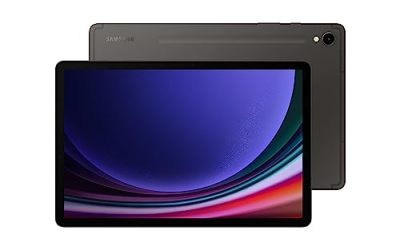
The Tab S11 is the current 11-inch flagship and the easiest recommendation for buyers who want one tablet that does everything well. Its Dynamic AMOLED 2X screen is bright and sharp for documents, the 3nm MediaTek processor keeps multitasking smooth, and the redesigned S Pen is included in the box. It supports Samsung’s Book Cover Keyboard for a proper typing setup and runs DeX for windowed work. The 256GB of storage and 12GB of RAM give it more headroom than the older Tab S9 at the same size, which makes it the better long-term buy for students and professionals.
Samsung Galaxy Tab S10+
- Best for: Split-screen workers who want more room than an 11-inch tablet gives.
- Display: 12.4-inch Dynamic AMOLED 2X, 2800 x 1752, 120Hz
- Processor: MediaTek Dimensity 9300+
- RAM: 12GB
- Storage: 256GB, expandable via microSD
Split-screen workers who want more room than an 11-inch tablet gives.
Confirm you are ordering the Wi-Fi version, since carrier 5G variants of this model use different listings.
The Tab S10+ is the middle ground that suits people who work in two apps at once. The 12.4-inch AMOLED 2X display has an anti-reflection coating that helps under office lighting, and there is enough width for a document and a reference page side by side without cramped text. The Dimensity 9300+ processor and 12GB of RAM handle DeX mode comfortably, and the S Pen comes in the box for markup. With Samsung’s keyboard cover attached, it behaves like a small laptop while staying far lighter than one, which makes it a strong pick for commuters who write all day.
Samsung Galaxy Tab S10 Ultra
The Tab S10 Ultra is built for buyers who want the tablet to be the main machine. Its 14.6-inch Dynamic AMOLED 2X screen is close to a small laptop display, so spreadsheets show more columns, timelines are easier to edit, and two full apps sit side by side without compromise. It runs the same Dimensity 9300+ platform as the S10+ with 12GB of RAM, supports the Book Cover Keyboard and DeX, and includes the S Pen. The trade-off is size: this is a desk-first device that you set down to use, not a tablet you curl up with for an hour of reading.
Specs
- Display: 14.6-inch Dynamic AMOLED 2X, 2960 x 1848, 120Hz
- Processor: MediaTek Dimensity 9300+
- RAM: 12GB
- Storage: 256GB
- Battery: 11,200 mAh
- Included: S Pen
- Display coating: Anti-reflection
- Model: SM-X920
Best for: Desk-based users who want the largest Android OLED canvas for keyboard work.
Watch out for: The size and weight make handheld reading tiring, and the keyboard cover adds further bulk.
ASIN: B0DJ5796F6
Samsung Galaxy Tab S9+
- Best for: Buyers who want the 12.4-inch size and keyboard support from the previous generation.
- Display: 12.4-inch Dynamic AMOLED 2X, 2800 x 1752, 120Hz
- Processor: Snapdragon 8 Gen 2
- RAM: 12GB
- Storage: 256GB, expandable via microSD
Buyers who want the 12.4-inch size and keyboard support from the previous generation.
As a 2023 model it will stop receiving software updates sooner than the S10 and S11 lines.
The Tab S9+ remains a sensible route into a 12.4-inch AMOLED tablet with full keyboard support. Its Snapdragon 8 Gen 2 processor is still quick for documents, browsing, and media, and the 120Hz Dynamic AMOLED 2X panel matches the size and resolution of the newer S10+. You get 12GB of RAM, 256GB of storage with microSD expansion, and the S Pen in the box. It pairs with Samsung’s Book Cover Keyboard for the same connector-based typing experience. Buyers choosing between generations should weigh the older chip and shorter remaining software support window against the larger screen they get at this tier.
Samsung Galaxy Tab S9
The Tab S9 is the portable pick: an 11-inch tablet that disappears into a bag yet still anchors a real typing setup with its Book Cover Keyboard. The Dynamic AMOLED 2X display brought OLED to this size in Samsung’s range, the Snapdragon 8 Gen 2 keeps everyday work responsive, and the S Pen is included for notes and annotation. Storage starts at 128GB with a microSD slot for expansion, and the 8GB of RAM is enough for writing, browsing, and streaming, though heavy multitaskers will feel the difference against the 12GB models above. It suits students who carry it everywhere.
Specs
- Display: 11-inch Dynamic AMOLED 2X, 2560 x 1600, 120Hz
- Processor: Snapdragon 8 Gen 2
- RAM: 8GB
- Storage: 128GB, expandable via microSD
- Battery: 8,400 mAh
- Included: S Pen
- Durability: IP68 rating
- Model: SM-X710
Best for: Students and travelers who prioritize a light bag without giving up OLED or a keyboard.
Watch out for: The 128GB storage and 8GB of RAM are the tightest in this guide, so plan on microSD expansion.
ASIN: B0C4BC6R95
Which One Fits Your Situation
You write and study on the move
Choose the Galaxy Tab S11 if your day mixes lectures, library sessions, and writing in different places. It is the newest 11-inch model, so it pairs the longest software support with a screen that stays readable anywhere, and the keyboard cover turns it into a note-taking station in seconds. The Tab S9 is the alternative if the older generation meets your needs and you would rather put the difference toward the keyboard and a microSD card.
You work in two apps side by side
Pick the Galaxy Tab S10+ when your workflow means a document next to a browser, or email next to a spreadsheet. The 12.4-inch screen is the smallest size where split-screen stops feeling like a compromise, and the anti-reflection coating helps in bright offices. The Tab S9+ offers the same screen size and keyboard experience on the previous-generation platform if you are comparing across generations.
You want one device instead of a laptop
The Galaxy Tab S10 Ultra is the only pick here that genuinely fills a laptop’s role at a desk. Its 14.6-inch display shows full-width documents and wide spreadsheets, and with the keyboard cover and DeX it handles a full day of writing and communication apps. Just be honest about how rarely you will hold it in your hands, because that size is a commitment.
Movies and reading come first, typing second
If the OLED screen is mainly for video and reading, and the keyboard is for occasional emails and searches, the Tab S9 keeps things light and simple. Its 11-inch AMOLED panel delivers the same contrast for films as the larger models, and you can add the keyboard cover later when a trip or course demands more typing. The S11 is the step up if you expect the typing share of your usage to grow.
Common Mistakes
- Assuming the keyboard is in the box: every tablet here includes the S Pen, but the keyboard cover is always a separate purchase.
- Buying a keyboard cover made for a different generation: the S9, S10, and S11 covers are model-specific and do not interchange.
- Choosing a tablet with an LCD screen by mistake: the FE and Lite models in Samsung’s range use LCD panels, not AMOLED, despite similar names.
- Ignoring storage because of the cloud: offline documents, downloaded courses, and media fill 128GB quickly, so check for a microSD slot or pick 256GB.
- Expecting desktop software on Android: DeX improves multitasking, but your apps are still Android apps, so confirm the tools you rely on exist there.
Frequently Asked Questions
Do these tablets come with a keyboard included?
No. Each tablet in this guide includes an S Pen in the box, but the keyboard is a separate accessory. Samsung sells Book Cover Keyboard covers designed for each model, and they attach through a built-in connector rather than Bluetooth. Any standard Bluetooth keyboard will also work if you prefer your own, though it needs its own charging and pairing.
What makes an OLED or AMOLED tablet screen better for work?
AMOLED panels light each pixel individually, so black text backgrounds and dark document themes show true black instead of gray, and contrast stays strong at wide viewing angles. For long reading and writing sessions that means crisp text edges and less washed-out color under bright light. The anti-reflection coatings on the S10 models add a further advantage in offices and classrooms with overhead lighting.
Can an Android tablet with a keyboard replace a laptop?
For writing, email, browsing, video calls, and cloud-based documents, yes, especially the larger models running Samsung DeX, which provides a windowed, desktop-style layout. The limits are specific desktop programs that have no Android equivalent and some advanced spreadsheet or development tools. If your work lives in a browser and office apps, a 12.4-inch or 14.6-inch model here can plausibly be your only machine.
Which size should I choose for typing and note-taking together?
An 11-inch model such as the Tab S11 or Tab S9 balances both jobs: the keyboard is compact but full enough for regular writing, and the tablet stays comfortable for handwritten notes with the S Pen. Move to 12.4 inches if you routinely split the screen, and reserve the 14.6-inch Ultra for desk-based work where handwriting is occasional rather than central.
More from Amazon
Programs that pair well with the guide above. Offers and eligibility are set by Amazon and may change.
A free business account with business pricing and bulk-buying tools for work, shop or home office.
Create a business accountFree shipping on eligible items, Prime Video and more. Eligible new members can start with a free trial.
Start a Prime free trialAudiobooks and podcasts to listen to on the go. Eligible new members can start with a free trial.
Try Audible freeAd-free music streaming. Eligible new subscribers can start with a free trial.
Try Music Unlimited freeAs an Amazon Associate we earn from qualifying purchases.








Write Your Review
No reviews yet. Be the first to share your experience!